
Table of Contents
The letters at the end of an Intel desktop processor name look minor, but they change what the chip can do and what it costs. Two processors with the same generation, core count, and cache can differ in whether they can be overclocked, whether they can produce a video signal without a graphics card, and how much you pay for them. The three suffixes buyers meet most often are K, KF, and F.
In short, K marks a processor with an unlocked multiplier and built-in integrated graphics. KF marks an unlocked processor with the integrated graphics disabled. F marks a processor with a locked multiplier and no integrated graphics. These meanings have stayed consistent across the 12th, 13th, and 14th Generation Core families and carry over to the Core Ultra 200S desktop series.
The choice matters because it is easy to pay for features you never use or to give up one you later need. An unlocked chip on a motherboard that cannot overclock wastes its main advantage. A processor without integrated graphics leaves a system with no display output if the graphics card fails or is not yet installed. Understanding each suffix lets you match the processor to your actual build rather than to the model name alone.
This guide explains what each suffix means, compares K with KF and K/KF with F using real processor examples, and covers whether you need integrated graphics at all. It then recommends the right option for gaming, overclocking, media work, troubleshooting, and budget builds, and closes with the other suffixes, such as KS, that you may come across.
What Do K, KF and F Mean on Intel Processors?
On Intel desktop processors, K means the multiplier is unlocked for overclocking, F means the integrated graphics are disabled so a discrete graphics card is required, and KF combines both: an unlocked multiplier with no usable integrated graphics. The suffixes describe two independent features, one about overclocking (K) and one about graphics (F), and a processor name simply lists whichever apply.
The suffix does not usually change the underlying design. Within a single model number, such as the Core i7-14700 family, the variants share the same architecture, core count, and cache size. What differs is the unlock status, the presence of integrated graphics, and, for the locked F models, the default clock speeds and power rating. That is why the suffix can affect price and capability without implying a different generation or tier of processor.
What Does K Mean?
The K suffix means the processor has an unlocked multiplier, which allows you to raise its clock speed beyond Intel's stock settings, and K models also include integrated graphics. A processor's core frequency is set by a multiplier applied to a base clock, and on locked chips the multiplier cannot be raised above the maximum Intel allows. On a K chip you can increase it through the motherboard BIOS or tuning software.
K processors are Intel's enthusiast-oriented desktop models, and they generally ship with higher base clocks and a higher base power rating than their non-K counterparts. For example, the Core i7-14700K has a 3.4 GHz base clock and 125 W base power, while the locked Core i7-14700F has a 2.1 GHz base clock and 65 W base power. Overclocking also depends on the rest of the system: you need a compatible chipset, a motherboard with a robust power-delivery design, and a cooler capable of handling the extra heat. Many buyers choose a K model for its higher stock performance without ever overclocking it.
What Does F Mean?
The F suffix means the processor has no functional integrated graphics, so it must be paired with a discrete graphics card to produce any video output. Intel sells F models at a lower price than the equivalent chip with graphics, which makes them attractive for builders who already plan to install a graphics card.
An F processor with no other letter, such as the Core i7-14700F, also has a locked multiplier and lower default clocks and power limits than the K models in the same family. The motherboard's video ports will not work with an F processor installed, so every monitor must connect to the graphics card. The cores, cache, and memory support are otherwise the same design as the other variants of that model.
What Does KF Mean?
KF means the processor has an unlocked multiplier like a K model but ships without integrated graphics like an F model. It is effectively a K processor with the graphics disabled and a lower price.
Because the compute cores are the same, a KF chip matches its K counterpart in clock speeds, core count, cache, and overclocking capability. It suits builders who want unlocked performance and have a discrete graphics card, since they gain the price saving without giving up any of the processing features they will use.
What Is the Difference Between Intel K and KF?
The only functional difference between an Intel K and KF processor is integrated graphics: K models include them and KF models do not. Both have unlocked multipliers, the same cores and cache, and the same clock speeds, and the KF version is typically priced somewhat lower. Because most gaming and creative workloads run on the discrete graphics card or on the CPU cores, this difference rarely affects measured performance. Benchmark aggregators show the Core i7-14700K and 14700KF scoring within a margin that is effectively comparable, and the same holds for the Core i9-12900K and 12900KF.
Integrated Graphics
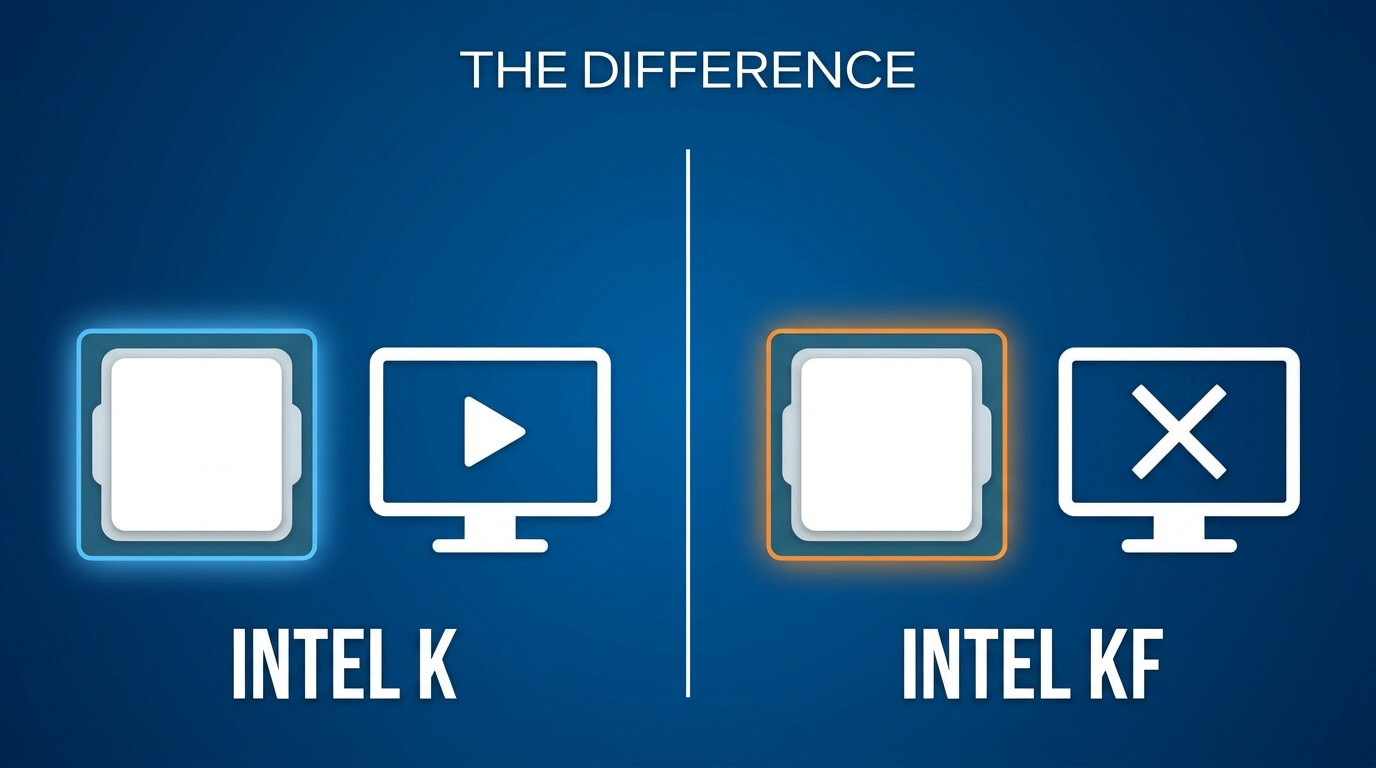
A K processor includes an enabled integrated GPU, such as Intel UHD Graphics 770 on the 12th and 14th Generation K models, while a KF processor has its integrated graphics disabled. The integrated GPU can drive monitors through the motherboard's video outputs, handle everyday desktop tasks, and run light games. It also provides hardware video encoding and decoding through Intel Quick Sync Video.
A KF processor cannot do any of this, so it requires a discrete graphics card before the system can display anything. When a discrete card is installed, the integrated GPU in a K chip typically sits idle, which means a K and KF processor behave the same in games and most professional applications. The integrated graphics matter mainly as a convenience and fallback rather than as a performance feature.
Overclocking Support
K and KF processors support overclocking equally, because both have unlocked multipliers and the graphics difference does not affect the CPU cores. Neither is inherently a better overclocker, since the headroom of any individual chip depends on silicon quality, cooling, and motherboard power delivery. A disabled iGPU may slightly reduce heat in theory, but an idle integrated GPU adds little, so the effect is too small to treat as a reason to pick one over the other.
Intel's overclocking support for newer platforms also treats the two variants alike. The company's 200S Boost profile for the Core Ultra 200S series covers both K and KF models, including the Core Ultra 9 285K, Core Ultra 7 265K and 265KF, and Core Ultra 5 245K and 245KF. It requires a Z890 motherboard and Intel XMP memory, and Intel offers it with warranty coverage for the overclock.
Price and Availability
KF processors usually cost less than their K equivalents, typically by a modest amount. At launch, Intel listed the Core i9-12900K at $589 and the 12900KF at $564 in tray pricing, and the Core i7-14700K at $409 against $384 for the 14700KF, a gap of $25 in both cases. The saving corresponds to the removal of the integrated graphics, not to any reduction in processing capability.
Street prices move with retailer stock and demand, so the gap can widen, shrink, or briefly disappear. Availability also varies by region and generation, and older models become scarcer as retailers clear inventory. Compare current prices for both variants before deciding, and treat the roughly $25 launch difference as a guide rather than a guarantee.
Example: Core i9-12900K vs Core i9-12900KF
The Core i9-12900K and Core i9-12900KF share the same specifications except for integrated graphics and price: both have 16 cores and 24 threads, a 3.2 GHz base clock, a 5.2 GHz maximum turbo clock, 30 MB of L3 cache, and a 125 W base power rating. The 12900K includes Intel UHD Graphics 770, and the 12900KF does not.
Intel's launch pricing placed the 12900K at $589 and the 12900KF at $564. In PassMark testing the two score within about one percent of each other, with the difference falling within normal variation between individual samples. For a build with a discrete graphics card, the 12900KF delivers the same practical performance at a lower cost, while the 12900K is the better pick if you want the display fallback and Quick Sync.
What Is the Difference Between Intel K/KF and F?
The difference between K/KF and F processors is that K and KF models have an unlocked multiplier and typically higher default clock speeds and power limits, while F models are locked and run at lower stock settings. Both KF and F lack integrated graphics, so the real contrast between those two is overclocking capability and stock performance. K additionally includes integrated graphics.
The performance gap can be meaningful in sustained multi-threaded work. A PassMark comparison dated August 2026 gave the Core i7-14700F a multi-threaded score of 41,325 against 51,950 for the 14700KF, roughly 20 percent lower, and a single-thread rating of 4,257 against 4,465. Those differences come from the F model's lower 2.1 GHz base clock, 5.4 GHz peak turbo, and 65 W base power rating compared with the KF's 3.4 GHz, 5.6 GHz, and 125 W. In gaming, where the graphics card usually sets the limit, the difference is much smaller.
Unlocked vs Locked Multiplier
An unlocked multiplier lets you set the processor's clock ratio above Intel's rated maximum, while a locked multiplier caps the frequency at the level the chip's automatic boost reaches. Locked F processors still boost automatically according to temperature, power, and workload, so they are not stuck at their base clock. They simply cannot be pushed past the limits Intel set.
For most users, this distinction matters less than the stock specifications. If you never plan to enter the BIOS to adjust multipliers, the unlocked status of a K or KF chip gives you nothing beyond the higher factory clocks and power budget that usually accompany it. Buyers who do want to tune their processor, whether to squeeze out extra performance or to experiment with undervolting, need the unlocked multiplier.
Chipset and Motherboard Considerations
To overclock the cores of a K or KF processor, you need a Z-series motherboard chipset, such as Z690 or Z790 for 12th to 14th Generation processors and Z890 for Core Ultra 200S. B-series and H-series boards generally do not allow core multiplier overclocking, although some, including B760 and B860 boards, support memory overclocking, which can improve performance with any compatible processor. Intel's Z890 is the only 800-series desktop chipset that allows both core and memory overclocking.
This affects how you spend your budget. Installing a K or KF processor on a B-series board works fine, but you will run it at stock settings, which reduces the benefit of paying for an unlocked chip. Conversely, an F processor on a Z-series board runs normally but wastes the premium that the chipset commands. Matching the processor and board to your overclocking intentions avoids paying for capability you cannot use. Also confirm CPU socket compatibility and BIOS support: 12th to 14th Generation processors use the LGA 1700 socket, Core Ultra 200S processors use LGA 1851, and some boards require a BIOS update to recognize newer chips.
Example: Core i7-14700K vs 14700KF vs 14700F
The Core i7-14700K, 14700KF, and 14700F are three versions of the same 20-core design with 8 performance cores, 12 efficient cores, and 28 threads. The K and KF models run at a 3.4 GHz base clock and up to 5.6 GHz, with a 125 W base power rating and an unlocked multiplier. The 14700F is locked, with a 2.1 GHz base clock, up to 5.4 GHz, and a 65 W base power rating.
Only the 14700K has integrated graphics, in the form of Intel UHD Graphics 770. Intel's launch prices were $409 for the 14700K, $384 for the 14700KF, and $359 for the 14700F, so each step down removes a feature and about $25. The K and KF perform almost identically, while the F trails in multi-threaded tasks but costs the least and still handles gaming well when paired with a capable graphics card.
Do You Need Integrated Graphics on an Intel CPU?
You do not need integrated graphics if you will install a discrete graphics card, but you do need them, or an alternative, if the processor will be the only source of video output. Most gaming and workstation builds include a dedicated GPU, which makes the integrated graphics redundant for everyday use. Systems without a discrete GPU, such as basic office PCs or compact media servers, depend on the integrated graphics to display anything at all.
The practical question is whether the safety net and extra features justify the added cost. For many builders they do not, which is why the F and KF variants exist. The decision depends on how much you value a fallback display output, hardware video encoding, and easier troubleshooting.
Running Without an iGPU
A computer with a KF or F processor runs normally as long as a discrete graphics card is installed and the monitors connect to the card's ports. The motherboard's own video outputs do nothing in this configuration, so plugging a monitor into them produces no image.
The system needs the graphics card in place before the first boot, because without a display device you cannot reach the BIOS or install an operating system. Once the card is installed and drivers are set up, day-to-day use is indistinguishable from a system with integrated graphics. The main exposure is a graphics card failure, which leaves the PC with no way to display anything until the card is repaired or replaced.
Features and Fallbacks You Lose
Choosing a KF or F processor means losing the motherboard's display outputs, Intel Quick Sync Video hardware acceleration, and an immediate fallback display for troubleshooting. Quick Sync speeds up video encoding and decoding and is used by some editing, streaming, and media-server applications, though discrete graphics cards offer their own hardware encoders, which cover most of the same ground.
The troubleshooting benefit is often the most valuable. When a system fails to boot or the screen stays blank, an integrated GPU lets you determine whether the graphics card is at fault by removing it and booting from the motherboard output. It also keeps a machine usable while a faulty card is sent for warranty replacement. With a KF or F chip, you would need a spare graphics card to perform the same test.
Which Should You Choose: K, KF or F?
Choose K if you want unlocked performance with integrated graphics as a fallback, KF if you want the same unlocked performance for less money and will use a discrete graphics card, and F if you want the lowest price and do not plan to overclock. The right option follows from two questions: whether you will overclock or want higher stock clocks, and whether you want integrated graphics available.
For many builders, the KF is the most cost-effective unlocked option and the F is the most economical overall, while K is the safest all-round choice. The following scenarios show how those priorities play out in specific kinds of builds.
Best for Gaming Builds with a Discrete GPU
For gaming with a discrete graphics card, the KF is generally the best value because it delivers the full performance of the K at a lower price, and the F is a reasonable alternative on a tight budget. Games are usually limited by the graphics card, so the difference between a K and a KF is practically unmeasurable in most titles, and even the F's lower stock clocks have a small effect at typical resolutions.
The F makes the most sense when you will run at 1440p or 4K, where the GPU limits frame rates more heavily. If you play at lower resolutions with a high-end graphics card, or run CPU-intensive games and streaming at the same time, the KF's higher clocks and power budget provide a more noticeable benefit.
Best for Overclocking
For overclocking, choose a K or KF processor paired with a Z-series motherboard and a capable cooler, and pick the KF if you have a discrete graphics card or the K if you want the integrated graphics available. Both variants overclock equally, so the decision comes down to whether you value the display fallback while experimenting with unstable settings.
Overclocking also carries trade-offs. It raises power consumption and heat, and manual overclocking can affect your warranty coverage. Intel's 200S Boost profile for Core Ultra 200S K and KF processors on Z890 boards is an exception, since it is designed to keep the system covered. Anyone attempting manual tuning should budget for stronger cooling and a quality power supply.
Best for Media, Workstation and Troubleshooting Needs
For media work, workstations, and troubleshooting, a K processor or a non-suffix model with integrated graphics is the better choice, because both keep Quick Sync and the motherboard display outputs. Intel also sells models with no suffix at all, such as the Core i7-14700, which combine integrated graphics with a locked multiplier and lower power draw.
If you do not need overclocking, a non-suffix chip can be the sensible option for a media server, office workstation, or a system where reliability and fallback display matter more than peak speed. Choose the K only when you want both the unlocked multiplier and the integrated graphics.
Best for Budget Builds
For budget builds, the F processor is usually the best option, since it has the lowest price among the variants and pairs well with a less expensive B-series motherboard. The savings, about $25 per step at launch for the Core i7-14700 family, can go toward a stronger graphics card, more memory, or a better power supply, which affect performance more in most builds.
The trade-off is that you accept lower stock clocks, no overclocking, and no integrated graphics. If your budget stretches to a KF for a small premium, it offers more headroom for the future. If you may need display output without a graphics card, a non-suffix model with integrated graphics is a better compromise than an F.
Other Intel Suffixes You May See (KS and More)
Beyond K, KF, and F, Intel uses several other suffixes: KS for special-edition processors with higher clocks and power limits, T for power-optimized models, X and XE for extreme high-performance chips, and letters such as H, HX, P, and U for laptop processors. A processor with no suffix is a standard locked model that includes integrated graphics.
KS processors are nearly identical to K models but run at higher frequencies and a higher base power rating. The Core i9-14900KS, for example, reaches up to 6.2 GHz and carries a 150 W base power rating, and it is sold as a limited-run premium option for buyers who want the highest stock performance Intel offers. T processors are designed for low power consumption, typically a 35 W base rating, and suit compact or energy-efficient systems. X and XE designations mark high-end, unlocked chips for enthusiast platforms. On the mobile side, HX models are Intel's highest-performance unlocked laptop chips, H models are high-performance, P models target thin and light laptops, and U and Y models focus on power efficiency. The older Intel naming system and the newer Core Ultra scheme both use these letters in similar ways, so the meanings carry over when you move from a 14th Generation chip to a Core Ultra 200S processor.
JOIN THE CONVERSATION
Leave a comment
Have a question or something to add? Share it with our editorial team. Comments are reviewed privately and are not published automatically.