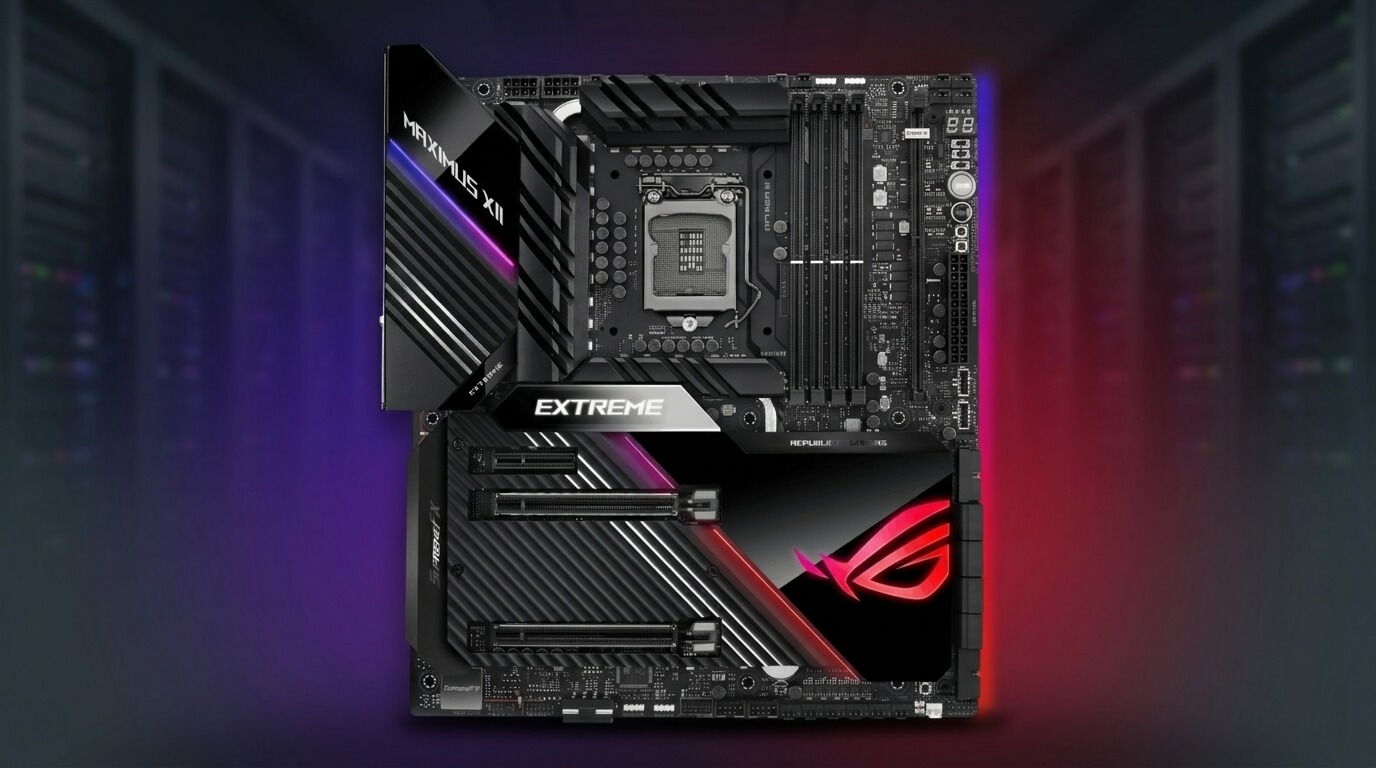
ASUS produces motherboards for four primary segments: gaming, workstation, general-purpose, and creator use. The company manufactures boards across the ROG, TUF Gaming, Prime, and ProArt lines, each targeting a different combination of budget, performance, and durability requirements. ASUS motherboards use ATX, Micro-ATX, and Mini-ITX form factors and support current Intel LGA1700/LGA1851 and AMD AM5 sockets, depending on the model and generation.
Motherboard quality depends on measurable engineering factors rather than brand reputation alone. VRM design, component grade, BIOS support, and warranty terms determine how a board performs under sustained load and how long it remains functional. ASUS applies these factors differently across its product tiers, so board quality varies by series and price point rather than by brand alone.
This guide evaluates ASUS motherboards against the engineering factors that define a good motherboard, compares ASUS reliability data against independent reviewer and user feedback, and explains each ASUS product line’s intended use case. It also covers motherboard revision numbering, a frequent source of buyer confusion, and positions ASUS against competing brands using consistent comparison criteria.
Readers can use this guide to identify which ASUS line matches their build requirements, understand common revision and compatibility questions, and evaluate whether ASUS suits their specific use case compared with alternative brands.
What Makes a Motherboard “Good”? Key Quality Factors
A good motherboard combines stable power delivery, high-grade components, adequate connectivity, and manufacturer support that matches the board’s intended lifespan. These four factors determine whether a board performs reliably under its rated workload and remains functional through multiple hardware upgrade cycles.
Power delivery quality affects CPU stability under load, particularly for unlocked or high-core-count processors. Component grade affects the board’s resistance to heat, electrical noise, and long-term degradation. Connectivity and I/O determine which storage, networking, and expansion devices the board supports. Warranty length and BIOS update frequency determine how long the manufacturer continues to support the board after purchase. A motherboard that scores well on power delivery but receives no BIOS updates after release still fails to qualify as a fully supported product.
VRM and Power Delivery Quality
VRM (voltage regulator module) quality determines how consistently a motherboard supplies power to the CPU under sustained load. A VRM converts input voltage from the power supply into the lower, regulated voltage the CPU requires, and it must maintain this output as current demand increases during heavy workloads.
VRM quality depends on phase count, MOSFET current rating, and the choke and capacitor components paired with each phase. A board with a higher phase count and higher-rated MOSFETs distributes heat and current across more components, which reduces thermal stress on any single phase. Entry-level boards typically use fewer phases and lower current-rated components, which limits their capacity for sustained overclocking or high-core-count CPUs. Mid-range and high-end boards add heatsinks directly over the VRM to manage the additional heat generated during extended loads.
Component and Capacitor Quality
Component and capacitor quality determines a motherboard’s resistance to heat degradation and electrical failure over its service life. Manufacturers rate capacitors by type, temperature tolerance, and expected operating lifespan under rated conditions.
Solid polymer capacitors resist heat and electrical stress better than older electrolytic capacitors, and most current ASUS boards use solid-state or polymer capacitors across all product tiers. Higher-end boards add additional protections, including chokes rated for higher temperatures and PCB designs with extra copper layers for improved heat dissipation. These component choices affect long-term reliability more than short-term performance, since capacitor degradation typically becomes measurable only after several years of continuous use.
Warranty and Support Policy
ASUS motherboard warranty terms typically range from one to three years depending on the region and product line, with some retailers or regional distributors extending coverage through registration programs. The warranty period covers manufacturing defects and component failure under normal operating conditions but does not cover physical damage, unauthorized modification, or damage from improper installation.
BIOS update frequency forms a separate but related support factor. ASUS releases BIOS updates to add CPU compatibility, fix stability issues, and patch security vulnerabilities, and update frequency varies by board age and product tier. Newer boards and higher-tier product lines generally receive BIOS updates more frequently than older or entry-level boards, particularly during the first one to two years after a chipset launch when CPU compatibility updates are most common.
Is ASUS a Reliable Motherboard Brand?
ASUS is a reliable motherboard brand across its full product range, with reliability varying by product tier rather than by brand overall. ASUS ranks among the top motherboard manufacturers by market share and maintains dedicated engineering teams for VRM design, BIOS development, and quality testing across its ROG, TUF Gaming, Prime, and ProArt lines.
Reliability differs from performance. A budget ASUS board can be reliable within its intended workload while lacking the power delivery capacity for extreme overclocking, and a high-end ASUS board can fail under rare manufacturing defects despite premium components. Reliability assessment therefore requires matching the board tier to the intended workload rather than assuming uniform performance across the entire ASUS lineup.
ASUS Reliability Compared to Reviewer and User Consensus
Independent reviewers and long-term users generally rate ASUS motherboards as reliable, with TUF Gaming and ROG boards receiving consistent praise for build quality and VRM design in hardware review coverage. Reviewer consensus across major hardware publications typically places ASUS alongside Gigabyte and MSI as one of the more dependable mainstream motherboard brands.
User feedback on retail platforms and community forums shows a similar pattern: most reported issues concern BIOS-related compatibility problems on new CPU launches rather than component failure. These compatibility issues typically resolve through a BIOS update rather than indicating a hardware defect. Long-term user reports on ROG and ProArt boards note fewer reliability complaints than entry-level Prime boards, consistent with the additional component grade and VRM capacity at higher price points.
Common Complaints and How Often They Occur
The most common ASUS motherboard complaints involve BIOS flashback failures, RGB software instability, and early-CPU-generation compatibility issues rather than outright board failure. These complaints appear most frequently in the weeks following a new CPU platform launch, when boards ship with BIOS versions that predate full compatibility testing for newly released processors.
Complaints about BIOS flashback failures typically stem from incorrect USB drive formatting or an interrupted flash process rather than a hardware fault, and ASUS documentation provides recovery steps for most flashback errors. Armoury Crate, ASUS’s RGB and system-monitoring software, generates a disproportionate share of user complaints relative to hardware-level issues, since it runs as a background service that can conflict with other system software. Outright board failure under normal operating conditions remains uncommon across ASUS’s product range, based on the pattern of complaints in reviewer and user reports.
ASUS Motherboard Product Lines Reviewed
ASUS organizes its motherboards into four primary product lines: ROG, TUF Gaming, Prime, and ProArt. Each line targets a distinct combination of budget, feature set, and intended use case, ranging from high-end gaming and overclocking to workstation and content-creation workloads.
The four lines share core engineering standards, including solid-state capacitors and multi-layer BIOS protection, but differ in VRM capacity, connectivity options, and included features such as Wi-Fi, RGB lighting, and expansion slots. Matching the correct line to a build’s requirements affects both immediate performance and long-term upgrade flexibility.
ROG (Republic of Gamers) — High-End Performance
ROG is ASUS’s flagship motherboard line, built for high-end gaming, overclocking, and enthusiast performance requirements. ROG boards use the highest VRM phase counts and MOSFET current ratings within the ASUS lineup, which supports sustained overclocking on unlocked CPUs.
ROG splits into sub-tiers, including ROG Maximus (Intel flagship), ROG Crosshair (AMD flagship), and ROG Strix (upper mid-range across both platforms). ROG boards typically include extensive connectivity, such as multiple M.2 slots with dedicated heatsinks, high-bandwidth USB ports, and premium onboard audio codecs. These boards carry the highest price point in the ASUS lineup and suit builders who prioritize maximum performance headroom and extensive customization options over cost efficiency.
TUF Gaming — Durability-Focused Mid-Range
TUF Gaming is ASUS’s mid-range line, built around durability testing and military-grade component certification rather than maximum feature density. TUF boards undergo additional stress testing for temperature tolerance, electrostatic discharge resistance, and moisture resistance compared with standard consumer boards.
TUF Gaming boards provide VRM capacity sufficient for moderate overclocking and mainstream high-performance builds, positioning them between Prime and ROG in both price and capability. The line favors simplified cosmetic design over extensive RGB lighting, which keeps the visual profile closer to a workstation aesthetic than ROG’s gaming-focused styling. TUF Gaming suits builders who prioritize long-term component durability and stable performance at a lower price point than ROG.
Prime — Everyday Reliability
Prime is ASUS’s entry-level to mainstream line, built for standard desktop use, office workloads, and budget-conscious gaming builds. Prime boards include the core reliability features found across the ASUS lineup, including solid-state capacitors, but with reduced VRM phase counts and fewer premium connectivity options compared with TUF Gaming and ROG.
Prime boards suit non-overclocking builds and general-purpose systems where sustained high-current CPU loads are uncommon. The line offers the lowest entry price within the ASUS lineup while maintaining the same baseline component quality standards, making it a suitable choice for builders prioritizing cost efficiency over overclocking headroom or premium I/O.
ProArt — Creator and Workstation Boards
ProArt is ASUS’s line built specifically for content creators and workstation users, prioritizing stability, color-accurate onboard displays, and multi-application workload support over gaming-oriented features. ProArt boards include VRM capacity comparable to ROG, supporting sustained multi-core CPU loads common in video editing, 3D rendering, and compilation workloads.
ProArt boards differentiate from gaming-focused lines through their muted, professional aesthetic and inclusion of features suited to creator workflows, such as additional Thunderbolt connectivity and dedicated status displays for system monitoring during render tasks. ProArt suits builders whose primary workload involves sustained multi-threaded processing rather than gaming, where consistent performance under prolonged full-load conditions matters more than peak gaming frame rates.
Understanding ASUS Motherboard Revisions (Rev X.0X)
ASUS labels motherboard revisions using a “Rev X.0X” format printed on the PCB, indicating incremental hardware or firmware changes made to a board after its initial release. A revision update typically addresses a manufacturing refinement, a component substitution, or expanded compatibility, without changing the board’s model name or core feature set.
Revisions matter to buyers because CPU compatibility, BIOS chip capacity, and occasionally VRM component sourcing can differ between revisions of the same board model. Checking the revision number before purchase, particularly for newer CPU generations, helps confirm whether a board will run a target CPU without a separate BIOS update procedure.
What the Rev Number Actually Means
The Rev number on an ASUS motherboard indicates the count of hardware revisions applied to that specific model since its original release, with Rev 1.0 representing the initial production version. Each subsequent revision, such as Rev 1.01 or Rev 1.02, reflects a minor hardware or manufacturing change rather than a new product.
Common reasons for a revision change include updated component suppliers, corrected PCB trace layouts, or an increased BIOS chip size to accommodate future CPU support. ASUS does not always publicize the specific changes between revisions, so the practical impact for most buyers centers on CPU compatibility and BIOS capacity rather than performance differences.
How to Find Your Board’s Revision Number
The revision number appears printed directly on the motherboard PCB, typically near the model name silkscreen text or close to the CPU socket. On a pre-built system or when the board is already installed, the revision number also appears in system information tools such as CPU-Z or in the BIOS/UEFI setup screen under system information.
Buyers can also confirm the revision number before purchase by checking the product listing on ASUS’s official website or the retailer’s product specification page, since some models sell in multiple revisions simultaneously. Matching the revision number against ASUS’s published CPU support list confirms compatibility before a purchase or BIOS update is needed.
Does a Lower Revision Mean Lower Quality?
A lower revision number does not mean lower quality; it indicates an earlier production batch rather than a downgraded product. ASUS revisions typically address manufacturing refinements or compatibility expansions rather than correcting a defect in the original design.
The primary practical difference between revisions involves BIOS chip capacity and default CPU compatibility rather than component grade or VRM performance. A Rev 1.0 board can require a BIOS update before supporting a newer CPU generation, while a later revision, such as Rev 1.02, may support that CPU without an update. Component quality and VRM design generally remain consistent across a model’s revisions unless ASUS explicitly documents a component change.
BIOS and CPU Compatibility Differences Between Revisions
BIOS and CPU compatibility differences between revisions typically stem from BIOS chip capacity limits rather than physical hardware changes. Older revisions with smaller BIOS chips can run out of storage space for CPU microcode as new processor generations release, requiring a manual BIOS update using an older, compatible CPU or a BIOS flashback tool before installing a newer CPU.
Later revisions often ship with a larger BIOS chip or a factory-updated BIOS version that supports newer CPUs out of the box, removing the need for a pre-installation update. Buyers assembling a build with the newest available CPU generation should confirm which revision they are purchasing and cross-reference it against the ASUS CPU support list for that specific board model before finalizing a build.
ASUS vs. Other Motherboard Brands
ASUS competes primarily with Gigabyte, MSI, and ASRock across comparable price tiers and product segments. Comparing these brands requires consistent criteria: VRM quality, BIOS support consistency, RGB and monitoring software stability, warranty terms, and price positioning within each performance tier.
ASUS and Gigabyte generally receive comparable reliability ratings from independent reviewers at equivalent price points, with ASUS often noted for more consistent BIOS update frequency during the first year after a chipset launch. MSI competes closely with ASUS in the mid-range segment, with MSI boards frequently priced slightly lower than equivalent ASUS TUF Gaming models while offering similar VRM specifications. ASRock typically positions its boards at a lower price point than ASUS across comparable feature sets, though ASRock’s high-end Taichi and Phantom Gaming lines compete directly with ASUS ROG Strix on VRM capacity and connectivity.
Software experience differs more between brands than core hardware reliability. ASUS Armoury Crate, MSI Center, and Gigabyte Control Center each manage RGB lighting, fan curves, and BIOS updates, and user reports across all three brands note occasional background-service conflicts. No single brand demonstrates a consistent, verifiable software reliability advantage over the others based on available reviewer and user feedback. Warranty length varies more by region and retailer than by brand, so buyers should confirm the specific warranty terms offered for their region before comparing brands on this criterion alone.
How to Choose the Right ASUS Motherboard for Your Build
Choosing the right ASUS motherboard starts with matching the CPU platform and socket, then narrowing the selection by workload: gaming and overclocking favor ROG or TUF Gaming, general desktop use favors Prime, and content-creation or workstation tasks favor ProArt.
Confirm the CPU socket and chipset compatibility first, since ASUS boards support specific Intel or AMD platforms rather than a universal socket. Next, match VRM capacity to the CPU’s power requirements: a high-core-count or unlocked CPU intended for overclocking requires the higher phase counts found in ROG or TUF Gaming boards, while a locked, lower-power CPU runs adequately on a Prime board. Buyers building around a newly released CPU should verify the board’s revision number and BIOS compatibility list before purchase, since an incompatible BIOS version can prevent the system from booting until updated.
Connectivity requirements narrow the selection further: builds requiring multiple high-speed M.2 drives, Wi-Fi 6E or 7, or Thunderbolt support need to check each candidate board’s specification sheet rather than assume feature parity within a product line. Budget constraints should account for the total build cost rather than the motherboard price alone, since allocating a disproportionate share of the budget to the motherboard can limit funds available for the GPU or CPU. Matching the board tier to the actual workload, rather than purchasing the highest available tier by default, produces the most cost-effective outcome for most builds.
High-performance gaming PCs built for gamers, creators, and competitors.
More From The Journal
Motherboard: Definition, Function, Sizes, Components
Learn what a motherboard is, what it does, how form factors differ, and which core parts like sockets, chipsets, VRMs, slots, ports, and headers matter most.
How to Choose a Motherboard: A Complete Buying Guide
Learn how to choose a motherboard by comparing socket compatibility, chipset features, RAM support, PCIe slots, storage options, rear I/O, and power delivery.