The AMD Ryzen 9 9950X3D is a 16-core, 32-thread desktop processor built on the AM5 socket with a 170W default TDP, a 4.3GHz base clock, a 5.7GHz boost clock, and 144MB of combined cache from AMD’s second-generation 3D V-Cache. It launched on March 12, 2025, at a $699 MSRP. Every AM5 motherboard chipset can physically accept the CPU, but the board’s VRM design, memory support, PCIe generation, and BIOS readiness determine how much of that 170W ceiling the chip can actually use.
AM5 chipsets fall into several tiers: B650 and B650E for mainstream and upper-mainstream builds, X670 and X670E for high-end multi-GPU and heavy I/O builds, B850, X870, and X870E as the second-generation refresh with mandatory PCIe 5.0 storage and USB4, and A620 and B840 as entry-level chipsets aimed at budget or non-gaming builds. The “E” suffix on B650E and X670E denotes full PCIe 5.0 support for both the graphics slot and at least one M.2 slot, while X870 and X870E replace B650E and X670E as AMD’s second-generation 800-series chipsets with wider native PCIe 5.0 lane counts and standard USB4.
Boards released before the Ryzen 9000 series launch require a BIOS update to boot a 9950X3D; boards released alongside or after the 800-series chipsets typically ship 9000-series-ready out of the box. VRM quality matters more with this CPU than with lower-wattage Ryzen chips, since sustained multi-core workloads can pull the full 170W package power, and Precision Boost Overdrive can push draw higher still on boards that allow it.
This guide covers 23 AM5 motherboards across nine chipset tiers, from budget A620 and B840 boards to flagship X870E models, evaluated specifically for how each pairs with the Ryzen 9 9950X3D.
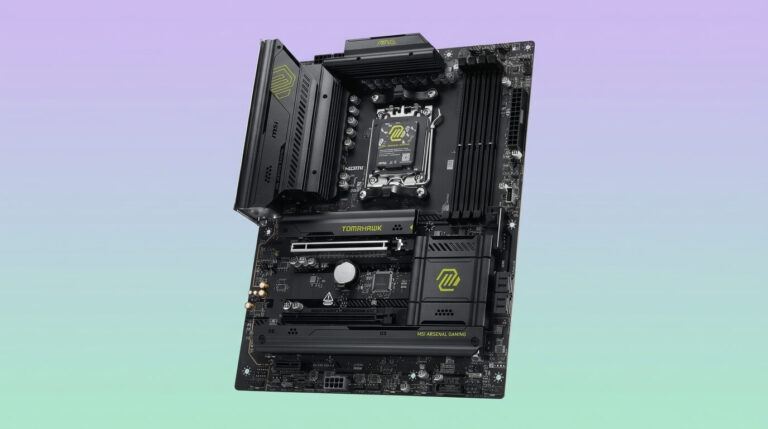
MSI MAG B650 Tomahawk WiFi
The MSI MAG B650 Tomahawk WiFi is a full-ATX B650 motherboard built around a 14+2+1 phase Duet Rail Power System with 80A power stages, giving the CPU roughly 1,120A of available current. That is enough headroom to run the Ryzen 9 9950X3D’s 170W TDP at stock settings and through moderate Precision Boost Overdrive tuning without VRM throttling, though the board is not intended for sustained all-core overclocking beyond AMD’s stock power limits. MSI pairs the VRM with an extended heatsink using 7W/mK thermal pads and a six-layer PCB with 2oz thickened copper for heat dissipation.
Memory support covers four DDR5 DIMM slots with a rated maximum of 256GB and overclocked speeds up to DDR5-6400 through AMD EXPO profiles. Two 8-pin EPS connectors feed the CPU, and MSI’s Memory Boost circuitry is intended to keep signal integrity clean at higher DIMM frequencies, a relevant factor since the 9950X3D benefits from faster memory in gaming workloads.
Expansion consists of one PCIe 4.0 x16 slot for the graphics card, a second PCIe 4.0 x16 slot that runs at reduced bandwidth, and one PCIe 4.0 x1 slot. All three M.2 slots run at PCIe 4.0 x4, with two of them shielded by MSI’s M.2 Shield Frozr heatsinks; the board does not offer PCIe 5.0 M.2 or PCIe 5.0 graphics bandwidth, since B650 (non-E) chipsets omit Gen5 support. Networking includes Wi-Fi 6E, Bluetooth 5.3, and 2.5Gb LAN, and the rear I/O provides a USB 3.2 Gen 2×2 (20Gbps) Type-C port alongside HDMI 2.1 and DisplayPort outputs.
Compared with the Asus TUF Gaming B650-Plus WiFi, the MSI board trades a PCIe 5.0 M.2 slot for a stronger CPU VRM current budget, while the Gigabyte B650 AORUS Elite AX splits the difference with a 14+2+1 phase design and a PCIe 5.0 M.2 slot of its own at a similar price. Buyers who prioritize maximum sustained CPU power delivery over Gen5 storage tend to prefer the Tomahawk; those who want a PCIe 5.0 SSD slot without moving up to B650E should look at the Asus or Gigabyte alternatives instead.
Pros
- 14+2+1 phase, 80A VRM comfortably handles the 9950X3D’s 170W TDP
- Three M.2 Gen4 slots with dedicated Shield Frozr cooling on two of them
- Wi-Fi 6E, 2.5Gb LAN, and a 20Gbps rear USB-C port at a mainstream price
- Extended VRM heatsink keeps power-stage temperatures in check under sustained load
Cons
- No PCIe 5.0 support for either the graphics slot or M.2 storage
- Requires a BIOS update out of the box to boot Ryzen 9000-series CPUs
- Only one full-bandwidth PCIe x16 slot for graphics
| Specification | MSI MAG B650 Tomahawk WiFi |
|---|---|
| Chipset | AMD B650 |
| Form factor | ATX |
| VRM | 14+2+1 phase, 80A power stages |
| Memory | 4x DDR5 DIMM, up to 256GB, EXPO up to DDR5-6400 |
| PCIe slots | 2x PCIe 4.0 x16, 1x PCIe 4.0 x1 |
| M.2 storage | 3x PCIe 4.0 x4 |
| Networking | Wi-Fi 6E, Bluetooth 5.3, 2.5Gb LAN |
| Rear USB | USB 3.2 Gen 2×2 (20Gbps) Type-C |
| Approximate price | $200–$260 |
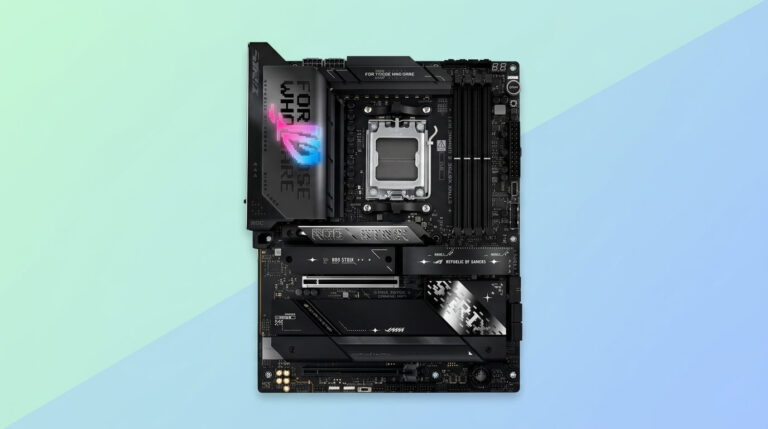
Asus ROG Strix B650E-F Gaming WiFi
The Asus ROG Strix B650E-F Gaming WiFi runs a 12+2 phase VRM using 80A SiC659 power stages, a configuration Asus rates for full-power operation with Ryzen 7000 and 9000 series flagships including the 9950X3D at stock settings. Because the B650E chipset carries full PCIe 5.0 support, the board provides a PCIe 5.0 x16 graphics slot with SafeSlot reinforcement and a PCIe 5.0 M.2 slot from the CPU, backed by two further PCIe 4.0 M.2 slots from the chipset, for three total M.2 slots.
Memory support spans four DDR5 DIMMs with EXPO-tuned speeds up to DDR5-6400 and Asus Enhanced Memory Profile support for kits without native EXPO. Rear connectivity includes a USB 3.2 Gen 2×2 (20Gbps) Type-C port, HDMI 2.1, DisplayPort 1.4, Wi-Fi 6E, Bluetooth 5.2, and Intel 2.5Gb Ethernet with Asus LANGuard. Compared with a non-E B650 board like the MSI MAG B650 Tomahawk WiFi, the Strix B650E-F trades roughly 400A of raw VRM current headroom for full Gen5 support on both the graphics slot and primary M.2 slot, a worthwhile exchange for builders planning a PCIe 5.0 GPU or SSD upgrade during the AM5 platform’s life. Reviewers have measured slightly lower game benchmark averages on this board relative to costlier X670E options, though the gap remains within a few percentage points and is unlikely to be noticeable outside controlled testing.
Pros
- Full PCIe 5.0 support on both the graphics slot and primary M.2 slot
- 12+2 phase, 80A VRM validated for 16-core Ryzen flagships including the 9950X3D
- Wi-Fi 6E, 2.5Gb LAN, and a 20Gbps rear USB-C port
- Three total M.2 slots with dedicated heatsinks
Cons
- VRM current budget trails higher-end X670E boards, limiting headroom for heavy PBO tuning
- Only one PCIe 5.0 M.2 slot; the remaining two run at PCIe 4.0
- Game benchmark averages run marginally behind pricier X670E boards in third-party testing
| Specification | Asus ROG Strix B650E-F Gaming WiFi |
|---|---|
| Chipset | AMD B650E |
| Form factor | ATX |
| VRM | 12+2 phase, 80A power stages |
| Memory | 4x DDR5 DIMM, up to 256GB, EXPO up to DDR5-6400 |
| PCIe slots | 1x PCIe 5.0 x16, additional PCIe 4.0 slots |
| M.2 storage | 1x PCIe 5.0 x4, 2x PCIe 4.0 x4 |
| Networking | Wi-Fi 6E, Bluetooth 5.2, 2.5Gb LAN |
| Rear USB | USB 3.2 Gen 2×2 (20Gbps) Type-C |
| Approximate price | $260–$310 |
Gigabyte X670 AORUS Elite AX
The Gigabyte X670 AORUS Elite AX pairs a 16+2+2 phase, 70A smart-power-stage VRM with the wider chipset I/O of X670, giving the 9950X3D a comfortable 1,120A CPU current budget and headroom that reviewers have measured staying near 45°C under sustained load. It supports four DDR5 DIMMs up to DDR5-6666 with EXPO, four M.2 slots (one PCIe 5.0 x4, three PCIe 4.0 x4), and four SATA ports, an 8-layer PCB with two thick copper plates for signal isolation, and Wi-Fi 6E with 2.5Gb LAN. Unlike X670E boards, it drops PCIe 5.0 support on the graphics slot itself, a feature with negligible real-world benefit for current GPUs, while retaining a PCIe 5.0 M.2 slot for fast primary storage.
Street pricing around $280–$290 sits well below comparable X670E boards while offering nearly identical VRM headroom and M.2 count, making the X670 AORUS Elite AX a stronger value than most X670E options for builders who do not specifically need a PCIe 5.0 graphics slot or USB4.
Pros
- 16+2+2 phase, 70A VRM with 1,120A of CPU current, ample for the 9950X3D
- Four M.2 slots including one PCIe 5.0 x4
- Wi-Fi 6E and 2.5Gb LAN at a price well below X670E boards
- 8-layer PCB with reinforced copper plates for durability
Cons
- No PCIe 5.0 support on the primary graphics slot
- Lacks USB4, a feature present on some competing X670E boards
- Fewer premium finishing touches (RGB, audio codec tier) than Gigabyte’s Master-series boards
| Specification | Gigabyte X670 AORUS Elite AX |
|---|---|
| Chipset | AMD X670 |
| Form factor | ATX |
| VRM | 16+2+2 phase, 70A power stages |
| Memory | 4x DDR5 DIMM, up to 128GB, EXPO up to DDR5-6666 |
| PCIe slots | 1x PCIe 4.0 x16, additional slots |
| M.2 storage | 1x PCIe 5.0 x4, 3x PCIe 4.0 x4 |
| Networking | Wi-Fi 6E, 2.5Gb LAN |
| Rear USB | Up to USB 3.2 Gen 2×2 |
| Approximate price | $280–$300 |
MSI MPG X670E Carbon WiFi
The MSI MPG X670E Carbon WiFi runs an 18+2+1 phase Duet Rail VRM using 90A power stages on an 8-layer server-grade PCB, giving the 9950X3D roughly 1,620A of available CPU current, comfortably beyond what its 170W TDP requires even with Precision Boost Overdrive tuning applied. Dual 8-pin CPU power connectors and a direct-touch heat-pipe VRM cooler keep power-stage temperatures controlled during sustained multi-core workloads, a scenario where the 16-core 9950X3D routinely exercises the full VRM budget during rendering or encoding tasks.
Storage consists of four M.2 slots, two running at PCIe 5.0 x4 with double-sided Shield Frozr cooling and two at PCIe 4.0 x4, plus dual PCIe 5.0 x16 slots that can operate as x8/x8 for multi-card configurations, a rare feature at this price point. Four DDR5 DIMMs support speeds up to DDR5-7800 with EXPO profiles, and MSI’s Memory Boost and Latency Killer features are aimed at keeping signal integrity clean at those higher frequencies, directly benefiting the 9950X3D’s gaming performance, which scales with faster memory. Connectivity includes Wi-Fi 6E, 2.5Gb LAN, and a 20Gbps USB 3.2 Gen 2×2 Type-C port, though the board notably omits USB4/Thunderbolt 4, a feature some X670E competitors include.
Against the Gigabyte X670E AORUS Master, the MSI Carbon offers a slightly higher-rated VRM (18+2+1 versus 16+2+2) and dual PCIe 5.0 x16 slots, while the Gigabyte counters with a stronger 105A-per-phase power stage rating and marginally more rear USB ports. Against the Asus ROG Crosshair X670E Hero, the MSI board costs roughly $250 less while sacrificing the Hero’s USB4 support and fifth M.2 slot.
Pros
- 18+2+1 phase, 90A VRM with 1,620A of CPU current headroom
- Two PCIe 5.0 M.2 slots and dual PCIe 5.0 x16 graphics slots
- DDR5 support up to 7800MT/s with EXPO
- Wi-Fi 6E, 2.5Gb LAN, and a 20Gbps USB-C port
Cons
- No USB4/Thunderbolt 4 support, unlike some X670E competitors
- Premium pricing relative to non-E X670 boards for a feature set gamers may not fully use
- Screwless M.2 locking mechanism has been reported as occasionally finicky
| Specification | MSI MPG X670E Carbon WiFi |
|---|---|
| Chipset | AMD X670E |
| Form factor | ATX |
| VRM | 18+2+1 phase, 90A power stages |
| Memory | 4x DDR5 DIMM, up to 192GB, EXPO up to DDR5-7800 |
| PCIe slots | 2x PCIe 5.0 x16 (x8/x8 capable), 1x PCIe 4.0 x16 |
| M.2 storage | 2x PCIe 5.0 x4, 2x PCIe 4.0 x4 |
| Networking | Wi-Fi 6E, 2.5Gb LAN |
| Rear USB | USB 3.2 Gen 2×2 (20Gbps) Type-C |
| Approximate price | $400–$450 |
MSI MAG B850 Tomahawk MAX WiFi
The MSI MAG B850 Tomahawk MAX WiFi carries a 14+2+1 phase Duet Rail Power System with 80A SPS power stages, giving the CPU roughly 1,120A of current, a figure MSI validated directly against the same VRM design used on the pricier MAG X870 Tomahawk WiFi. Because B850 mandates PCIe 5.0 for at least a portion of chipset lanes, unlike the earlier B650 chipset where Gen5 was optional, the board includes a PCIe 5.0 x16 graphics slot with Steel Armor II reinforcement and two PCIe 5.0 x4 M.2 slots, plus one PCIe 4.0 x4 and one PCIe 4.0 x2 M.2 slot for four total.
Four DDR5 DIMMs support EXPO-tuned speeds up to DDR5-8400, a meaningful jump over first-generation B650 boards, and both CPU and memory overclocking remain supported despite the mainstream chipset tier. Networking includes 5Gb LAN, a step up from the 2.5Gb standard on most B650/X670 boards, plus Wi-Fi 7. The board lacks a rear 20Gbps USB port and onboard RGB, both addressable through add-in components if needed.
Reviewers measured this board delivering boot times and thermal performance on par with pricier X870 boards while costing roughly $50 less, making it a strong value pick for builders who do not need X870’s mandatory USB4 support.
Pros
- 14+2+1 phase, 80A VRM shared with MSI’s pricier X870 Tomahawk
- Dual PCIe 5.0 M.2 slots and a PCIe 5.0 x16 graphics slot
- DDR5 support up to 8400MT/s with EXPO
- 5Gb LAN and Wi-Fi 7 at a mainstream price
Cons
- No rear 20Gbps USB-C port
- No onboard RGB lighting
- Lacks USB4, a mandatory feature on X870/X870E boards
| Specification | MSI MAG B850 Tomahawk MAX WiFi |
|---|---|
| Chipset | AMD B850 |
| Form factor | ATX |
| VRM | 14+2+1 phase, 80A power stages |
| Memory | 4x DDR5 DIMM, up to 256GB, EXPO up to DDR5-8400 |
| PCIe slots | 1x PCIe 5.0 x16 |
| M.2 storage | 2x PCIe 5.0 x4, 1x PCIe 4.0 x4, 1x PCIe 4.0 x2 |
| Networking | Wi-Fi 7, 5Gb LAN |
| Rear USB | Up to USB 3.2 Gen 2×2 (no 20Gbps port) |
| Approximate price | $210–$240 |
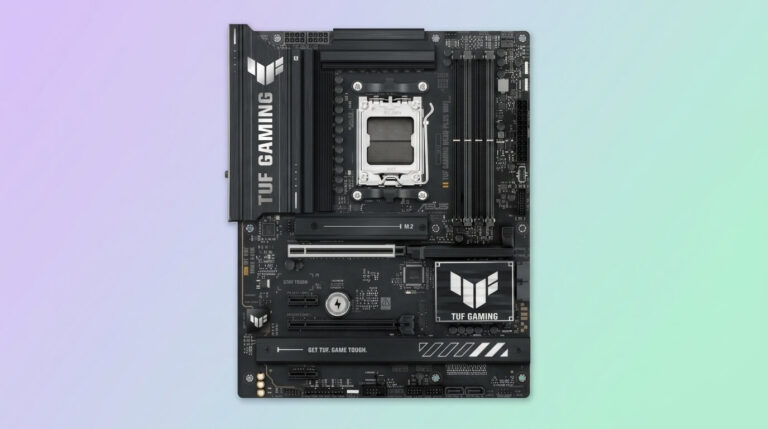
Asus TUF Gaming X870-Plus WiFi
The Asus TUF Gaming X870-Plus WiFi runs a 16(80A)+2(80A)+1(80A) phase Digi+ VRM through dual 8-pin ProCool power connectors, delivering ample current for the 9950X3D; independent thermal testing measured VRM temperatures peaking between 41°C and 47.5°C during a 20-minute full-load Cinebench run, well within safe operating range. An eight-layer PCB and Digi+ real-time voltage control support the board’s overclocking headroom, though the 9950X3D’s locked multiplier ratio on non-X3D cores means most tuning happens through Precision Boost Overdrive rather than manual all-core overclocking.
Storage covers two PCIe 5.0 M.2 slots plus additional PCIe 4.0 M.2 capacity, four DDR5 DIMMs supporting up to 192GB at speeds to 8000MT/s, and networking includes mandatory X870-tier features: Wi-Fi 7, 2.5Gb LAN, and dual USB4 (40Gbps) Type-C ports, one of which supports 30W fast charging via USB PD. A PCIe 5.0 x16 graphics slot and Realtek 2.5Gb Ethernet round out the connectivity package.
At a $210–$310 street price depending on region and promotions, the TUF Gaming X870-Plus WiFi undercuts most X870E boards while including the same mandatory USB4 and Wi-Fi 7 baseline, making it the strongest value pick among second-generation AM5 boards for builders who do not need X870E’s expanded PCIe 5.0 lane count or additional M.2 slots.
Pros
- 16+2+1 phase, 80A VRM with VRM temperatures staying below 48°C under sustained load
- Dual USB4 (40Gbps) ports, standard on the X870 tier
- Wi-Fi 7 and 2.5Gb LAN
- Competitive pricing relative to X870E alternatives
Cons
- Fewer total M.2 slots than X870E boards in this guide
- Single PCIe 5.0 x16 slot rather than the dual-slot configurations found on some X870E boards
- Industrial styling with minimal RGB may not suit builders wanting a flashier aesthetic
| Specification | Asus TUF Gaming X870-Plus WiFi |
|---|---|
| Chipset | AMD X870 |
| Form factor | ATX |
| VRM | 16+2+1 phase, 80A power stages |
| Memory | 4x DDR5 DIMM, up to 192GB, EXPO up to DDR5-8000 |
| PCIe slots | 1x PCIe 5.0 x16 |
| M.2 storage | 2x PCIe 5.0 x4, additional PCIe 4.0 slots |
| Networking | Wi-Fi 7, 2.5Gb LAN |
| Rear USB | 2x USB4 (40Gbps) Type-C |
| Approximate price | $210–$310 |
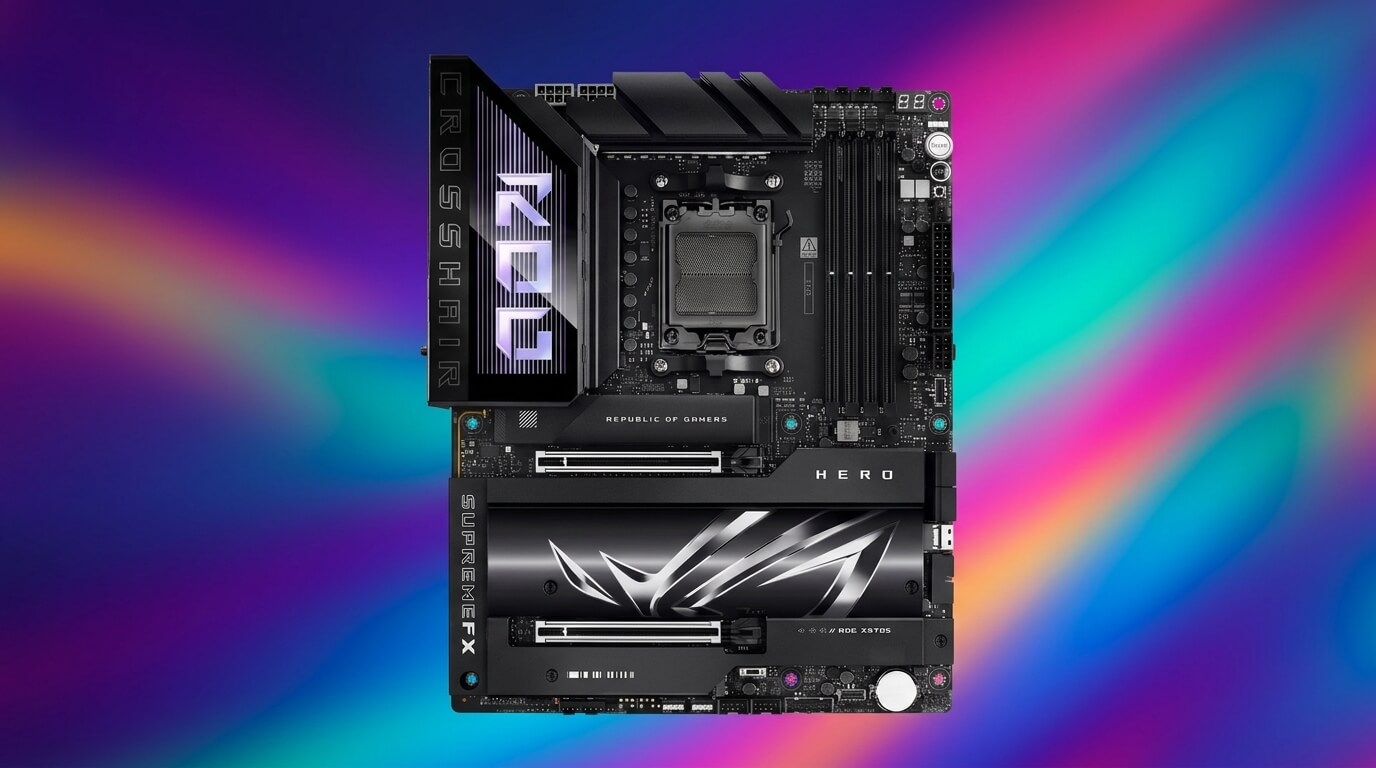
Asus ROG Crosshair X870E Hero
The Asus ROG Crosshair X870E Hero pairs an 18+2 configuration of 110A Vishay Smart Power Stages for Vcore with two further 80A stages for SoC power, delivering a current budget that comfortably exceeds what the 9950X3D’s 170W TDP requires even under sustained Precision Boost Overdrive tuning. Asus’ Digi+ ASP2205 controller manages the array, and large heatpipe-connected heatsinks keep the power stages within thermal spec during extended multi-core workloads, a scenario the 16-core 9950X3D reaches routinely during rendering and encoding tasks.
Storage consists of five M.2 slots, three of them PCIe 5.0 x4 with dedicated backplates for heat dissipation, plus a SlimSAS connector and four SATA ports, giving builders more total storage flexibility than any other board in this guide. Two PCIe 5.0 x16 slots support x16/x0 or x8/x8 configurations, and four DDR5 DIMMs support speeds to 8200MT/s. Networking includes Wi-Fi 7, 2.5Gb and 5Gb LAN, and dual USB4 ports alongside a 60W USB Power Delivery front-panel connector.
At $699, the Crosshair X870E Hero costs more than the Gigabyte X870E AORUS Master or MSI MPG X870E Carbon WiFi covered below, and reviewers have noted that populating the second and third Gen5 M.2 slots shares bandwidth with the second PCIe x16 slot, a real-world limitation for anyone running dual GPUs. For most single-GPU 9950X3D builds, though, the board delivers the widest storage and connectivity feature set of any X870E option reviewed here.
Pros
- 18+2+2 phase VRM with a current budget well beyond the 9950X3D’s requirements
- Five M.2 slots, three at PCIe 5.0, plus a SlimSAS connector
- Dual USB4 ports and Wi-Fi 7
- Dual PCIe 5.0 x16 slots for flexible expansion
Cons
- $699 price sits at the top of the X870E segment
- Second/third Gen5 M.2 slots share bandwidth with the secondary PCIe x16 slot
- SlimSAS connector has limited practical use for most desktop builders
| Specification | Asus ROG Crosshair X870E Hero |
|---|---|
| Chipset | AMD X870E |
| Form factor | ATX |
| VRM | 18+2+2 phase, 110A/80A power stages |
| Memory | 4x DDR5 DIMM, up to 192GB, EXPO up to DDR5-8200 |
| PCIe slots | 2x PCIe 5.0 x16 (x8/x8 capable) |
| M.2 storage | 3x PCIe 5.0 x4, 2x PCIe 4.0 x4 |
| Networking | Wi-Fi 7, 2.5Gb + 5Gb LAN |
| Rear USB | 2x USB4 (40Gbps) Type-C |
| Approximate price | $699 |
ASRock A620M Pro RS WiFi
The ASRock A620M Pro RS WiFi runs a 6+2+1 phase Dr.MOS VRM, a configuration built for mainstream Ryzen chips rather than a 170W, 16-core flagship. The A620 chipset itself does not support CPU overclocking regardless of motherboard, so the 9950X3D will run at its stock power limits on this board without the Precision Boost Overdrive headroom available on B650 and above; PC builders have reported the board’s VRM handling a Ryzen 9 7950X at stock settings without issue, a data point that extends cautiously to the similarly rated 9950X3D, but sustained full-load workloads leave less thermal margin than on boards with 12+ phases and higher-amperage power stages.
Storage covers three M.2 slots (two PCIe 4.0 x4, one PCIe 3.0 x2) and four SATA ports, while expansion is limited to a single PCIe 4.0 x16 slot, a chipset-level restriction of A620. Four DDR5 DIMMs support EXPO-tuned speeds up to 7200MT/s, and the board includes Wi-Fi 6E and Gigabit LAN, both features typically reserved for costlier boards in the sub-$150 segment. At roughly $110–$130, it is the cheapest way to build a functional AM5 platform with the 9950X3D, provided the buyer accepts no CPU overclocking and a VRM built for lower sustained power than the CPU’s full 170W ceiling.
Pros
- Wi-Fi 6E and Gigabit LAN at a sub-$130 price point
- Three M.2 slots and four SATA ports for a budget board
- DDR5 support up to 7200MT/s with EXPO
- Compact Micro-ATX footprint fits smaller cases
Cons
- A620 chipset does not support CPU overclocking
- 6+2+1 phase VRM offers less sustained current headroom than mainstream B650/B850 boards
- Single PCIe 4.0 x16 slot limits expansion
- Not recommended for sustained heavy multi-core workloads at full PBO tuning
| Specification | ASRock A620M Pro RS WiFi |
|---|---|
| Chipset | AMD A620 |
| Form factor | Micro-ATX |
| VRM | 6+2+1 phase, Dr.MOS |
| Memory | 4x DDR5 DIMM, up to 256GB, EXPO up to DDR5-7200 |
| PCIe slots | 1x PCIe 4.0 x16 |
| M.2 storage | 2x PCIe 4.0 x4, 1x PCIe 3.0 x2 |
| Networking | Wi-Fi 6E, Gigabit LAN |
| Rear USB | USB 3.2 Gen 1 (no 10Gbps+ ports) |
| Approximate price | $110–$130 |
Asus Prime B840M-A WiFi
The Asus Prime B840M-A WiFi runs an 8+2+1 phase Digi+ VRM delivering roughly 60A, a configuration Asus itself rates as best suited to CPUs of 65W TDP or lower; pairing it with the 9950X3D’s 170W TDP means the CPU will run within spec at stock settings, since AMD’s power management still governs actual draw, but it leaves little thermal margin for Precision Boost Overdrive tuning, and the B840 chipset does not support CPU overclocking in any case.
Storage covers three M.2 slots, two running at PCIe 4.0 x4 from the CPU and one at PCIe 3.0 from the chipset, since B840 uses AMD’s Promontory 19 chip, a carryover from the AM4-era B550 chipset that supports only PCIe 3.0 speeds on its own lanes. Four DDR5 DIMMs support EXPO-tuned speeds up to 7600MT/s and up to 192GB total capacity, and the board includes Wi-Fi 6E, 2.5Gb LAN, and a full set of Q-Design DIY features shared with Asus’ pricier Prime boards. At roughly $180–$230, it is priced closer to a mainstream B650 board than to the A620 boards above, largely on the strength of its DDR5-7600 memory support and Wi-Fi 6E inclusion, despite the entry-level chipset underneath.
Pros
- DDR5 memory support up to 7600MT/s, faster than most other budget boards in this guide
- Wi-Fi 6E and 2.5Gb LAN
- Three M.2 slots, two at PCIe 4.0
- Full Q-Design EZ DIY feature set
Cons
- 8+2+1 phase VRM rated by Asus for CPUs up to 65W TDP, well below the 9950X3D’s 170W
- B840 chipset does not support CPU overclocking
- Chipset-connected lanes run at PCIe 3.0 only
- Priced close to mainstream B650 boards despite entry-level chipset limitations
| Specification | Asus Prime B840M-A WiFi |
|---|---|
| Chipset | AMD B840 |
| Form factor | Micro-ATX |
| VRM | 8+2+1 phase, ~60A |
| Memory | 4x DDR5 DIMM, up to 192GB, EXPO up to DDR5-7600 |
| PCIe slots | 1x PCIe 4.0 x16, 2x PCIe 3.0 x16 (x1 mode) |
| M.2 storage | 2x PCIe 4.0 x4, 1x PCIe 3.0 |
| Networking | Wi-Fi 6E, 2.5Gb LAN |
| Rear USB | USB 5Gbps Type-C, USB 10Gbps Type-A |
| Approximate price | $180–$230 |
How to Choose the Right Motherboard for Ryzen 9 9950X3D
Choosing the right motherboard for the Ryzen 9 9950X3D means matching VRM current capacity, chipset tier, memory speed, and PCIe generation to how the CPU will actually be used, since the 170W TDP and 16-core count make VRM quality a bigger factor than with lower-wattage Ryzen chips.
VRM phase count and power-stage amperage together determine how much sustained current a board can deliver to the CPU. Boards with 14 or more Vcore phases rated at 70A or higher, such as the MSI MAG B650 Tomahawk WiFi or Gigabyte X670 AORUS Elite AX, comfortably run the 9950X3D at its 170W TDP and through moderate Precision Boost Overdrive tuning. Entry-level A620 and B840 boards with 6 to 8 phases rated near 60A, such as the ASRock A620M Pro RS WiFi or Asus Prime B840M-A WiFi, keep the CPU within its stock power envelope but offer no CPU overclocking support and less thermal margin under sustained multi-core loads.
Chipset tier determines PCIe generation and I/O breadth rather than raw compatibility, since every AM5 chipset covered in this guide physically accepts the 9950X3D. B650 and X670 omit PCIe 5.0 on the graphics slot; B650E and X670E add it. B850, X870, and X870E form AMD’s second-generation 800-series refresh, mandating PCIe 5.0 storage lanes and, on X870 and X870E, standard USB4 connectivity. A620 and B840 trade PCIe 5.0, CPU overclocking, and higher VRM budgets for lower cost, suiting budget or non-gaming builds more than a flagship 16-core CPU.
Memory speed affects the 9950X3D’s gaming performance more than most workloads, since faster DDR5 with tighter timings reduces latency between the CPU cores and the 3D V-Cache. Boards supporting EXPO profiles at DDR5-6000 or higher, a baseline met by nearly every board in this guide except the lowest-tier A620 and B840 options, extract the CPU’s full gaming performance; boards capped near DDR5-6400 to DDR5-6600 leave a small amount of performance on the table compared with X670E and X870E boards rated to DDR5-8000 or beyond.
Form factor and price should match the rest of the build rather than the CPU alone. A $699 flagship CPU pairs logically with a board in the $200 to $500 range for most builders, since spending on VRM headroom and PCIe 5.0 storage delivers a more direct benefit than budget-tier chipsets that undercut the VRM the CPU can actually use. Builders on a strict budget can pair the 9950X3D with an A620 or B840 board and accept the loss of CPU overclocking and reduced sustained-load thermal margin, since the CPU’s Precision Boost algorithm still governs safe operation within the board’s power delivery limits, but a mid-range B650, B850, or X870 board offers meaningfully more long-term headroom for a CPU at this price point.