
Table of Contents
The RTX 5080 pairs with two current desktop platforms: AMD’s AM5 socket (X870E and X870 chipsets) and Intel’s LGA 1851 socket (Z890 chipset). Both platforms expose a PCIe 5.0 x16 slot from the CPU, so the GeForce RTX 5080 reaches full bandwidth on either side. The card draws 360 W of total graphics power and uses a 16-pin 12V-2×6 connector, so the motherboard itself does not limit GPU power delivery. The deciding factors instead are slot spacing, PCIe lane allocation, VRM capacity for the paired CPU, and the storage and connectivity the board offers around the card.
A motherboard built for an RTX 5080 needs a PCIe 5.0 x16 slot with reinforced steel shielding to support the card’s weight, adequate spacing above the slot for triple-fan and triple-slot coolers, and a VRM rated for the flagship CPU the builder intends to pair with the GPU. Chipset choice also affects available PCIe 5.0 M.2 storage, USB4 connectivity, and networking, since these boards route lanes differently between the graphics slot and onboard storage.
This guide reviews six motherboards spanning both platforms: the MSI MEG X870E Godlike and ASRock X870E Taichi as high-end AM5 boards, the MSI MAG X870E Tomahawk WiFi and ASUS PRIME X870-P WiFi as mainstream AM5 boards, and the ASUS ROG Maximus Z890 Hero and ASRock Z890 Taichi Lite as the Intel LGA 1851 options. Each entry covers the board’s specifications, how it behaves with a flagship CPU on its platform, and how it compares against the other boards on this list.
Evaluation criteria across all six boards include PCIe 5.0 x16 slot configuration, VRM phase count and current rating, DDR5 memory support, M.2 Gen5 storage availability, and rear I/O connectivity. A closing section explains how to weigh these factors when selecting a board for an RTX 5080 build.
THE SHORTLIST
This guide, at a glance
Compare the products covered below, then explore the strengths, limitations, and specifications that matter to you.
 Check current priceView on Amazon: MSI MEG X870E Godlike (opens in a new tab)
 Check current priceView on Amazon: ASUS ROG Maximus Z890 Hero (opens in a new tab)
 Check current priceView on Amazon: ASRock X870E Taichi (opens in a new tab)
 Check current priceView on Amazon: MSI MAG X870E Tomahawk WiFi (opens in a new tab)
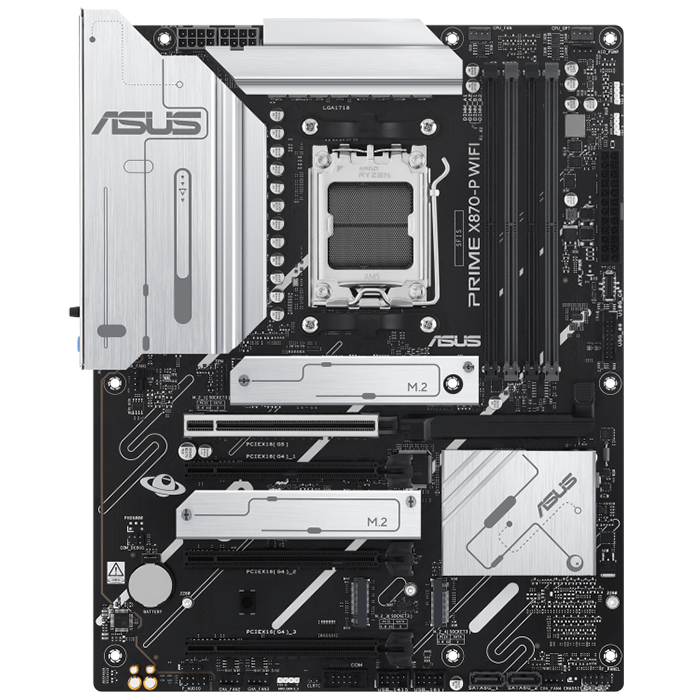 Check current priceView on Amazon: ASUS PRIME X870-P WiFi (opens in a new tab)
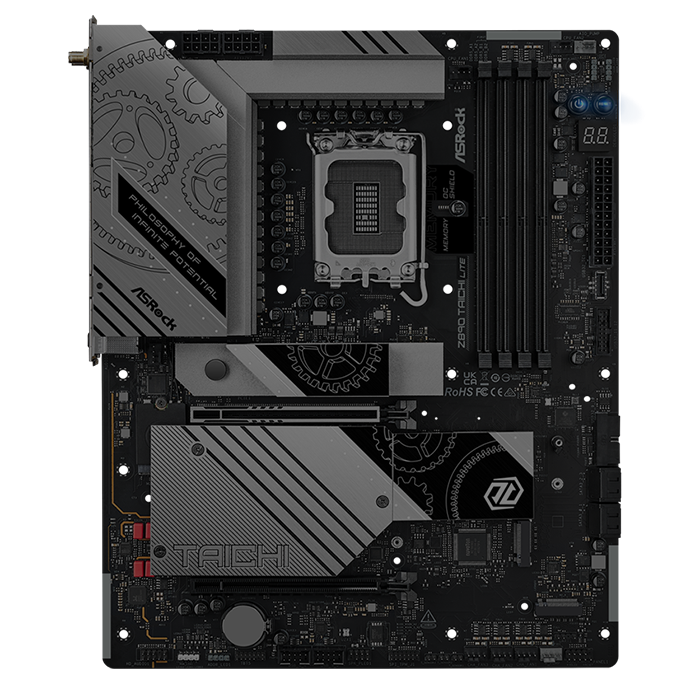 Check current priceView on Amazon: ASRock Z890 Taichi Lite (opens in a new tab)
Purchase links open Amazon. Confirm the exact model, price, availability, and seller terms before ordering.
Best Motherboards for Nvidia RTX 5080 Graphics Card
MSI MEG X870E Godlike
Pricing and availability on Amazon
Pros & cons
Strengths
- 24+2+1 phase, 110A VRM handles flagship Ryzen CPUs with headroom
- Two PCIe 5.0 x16-capable slots and up to seven total M.2 slots
- 10G and 5G dual LAN plus Wi-Fi 7 for high-end networking
- Dynamic Dashboard III provides on-board diagnostics without a monitor
Limitations
- E-ATX size requires a case with matching mounting standoffs
- Premium price places it well above mainstream X870E boards
- Limited initial production runs of some Godlike variants restrict availability
Review notes
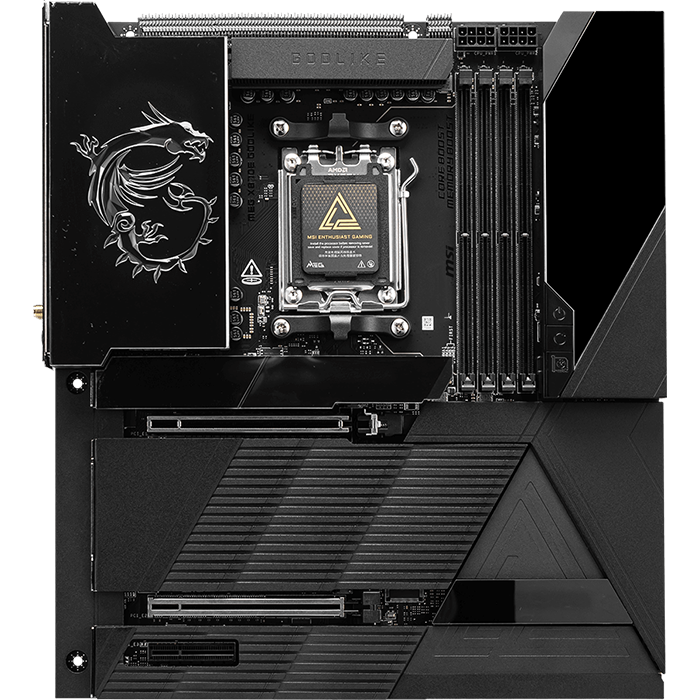
The MSI MEG X870E Godlike is a flagship E-ATX motherboard for the AMD AM5 platform, built around the X870E chipset and positioned as MSI’s top offering for Ryzen 9000, 8000, and 7000 series processors. The board uses a 24+2+1 Duet Rail Power System rated at 110 A per phase, backed by dual 8-pin CPU power connectors, giving it enough sustained current for the highest-TDP Ryzen 9000 chips running alongside an RTX 5080.
The primary PCIe 5.0 x16 slot connects directly to the CPU and runs the RTX 5080 at full x16 bandwidth without sharing lanes with the secondary slot when only one card is installed. The 10-layer PCB with 2 oz copper traces and the dual 8-pin CPU power design let the board sustain a Ryzen 9 9950X or 9950X3D at stock or overclocked settings while the GPU pulls its full 360 W independently through its own 12V-2×6 connector, so CPU and GPU power delivery do not compete for headroom.
Compared with the ASRock X870E Taichi, the Godlike offers a stronger VRM (110A across 24 phases versus the Taichi’s 105A across 24 phases) and more M.2 Gen5 capacity through its bundled expansion card, but the Taichi costs less and still covers the same core feature set for most RTX 5080 builds. Against the MSI MAG X870E Tomahawk WiFi, the Godlike adds a second PCIe 5.0 slot, dual 10G/5G LAN, and the LCD dashboard, features a mainstream board does not need for a single-GPU RTX 5080 system.
Specs & configuration
| Specification | Details |
|---|---|
| Form factor | E-ATX |
| Socket / Chipset | AM5 / AMD X870E |
| CPU support | AMD Ryzen 9000 / 8000 / 7000 series |
| VRM | 24+2+1 phases, 110A SPS, dual 8-pin CPU power |
| Memory | 4x DDR5 DIMM, up to 256GB, 8400+ MT/s (OC) |
| PCIe slots | 1x PCIe 5.0 x16 (CPU), 1x PCIe 5.0 x8 (CPU), 1x PCIe 4.0 x4 (chipset) |
| M.2 storage | 2x Gen5 x4 (CPU), 2x Gen5 x4 via bundled expansion card, 2x Gen4 x4, 1x Gen4 x2 |
| SATA | 4x SATA 6Gbps |
| Networking | 10G LAN + 5G LAN, Wi-Fi 7, Bluetooth 5.4 |
| USB (rear) | 2x USB4 (40Gbps), 1x USB 20Gbps, multiple USB 10Gbps and 5Gbps ports |
| Audio | ALC4082 codec with ESS DAC |
| Extras | 3.99-inch Dynamic Dashboard III LCD, EZ Link header consolidation |
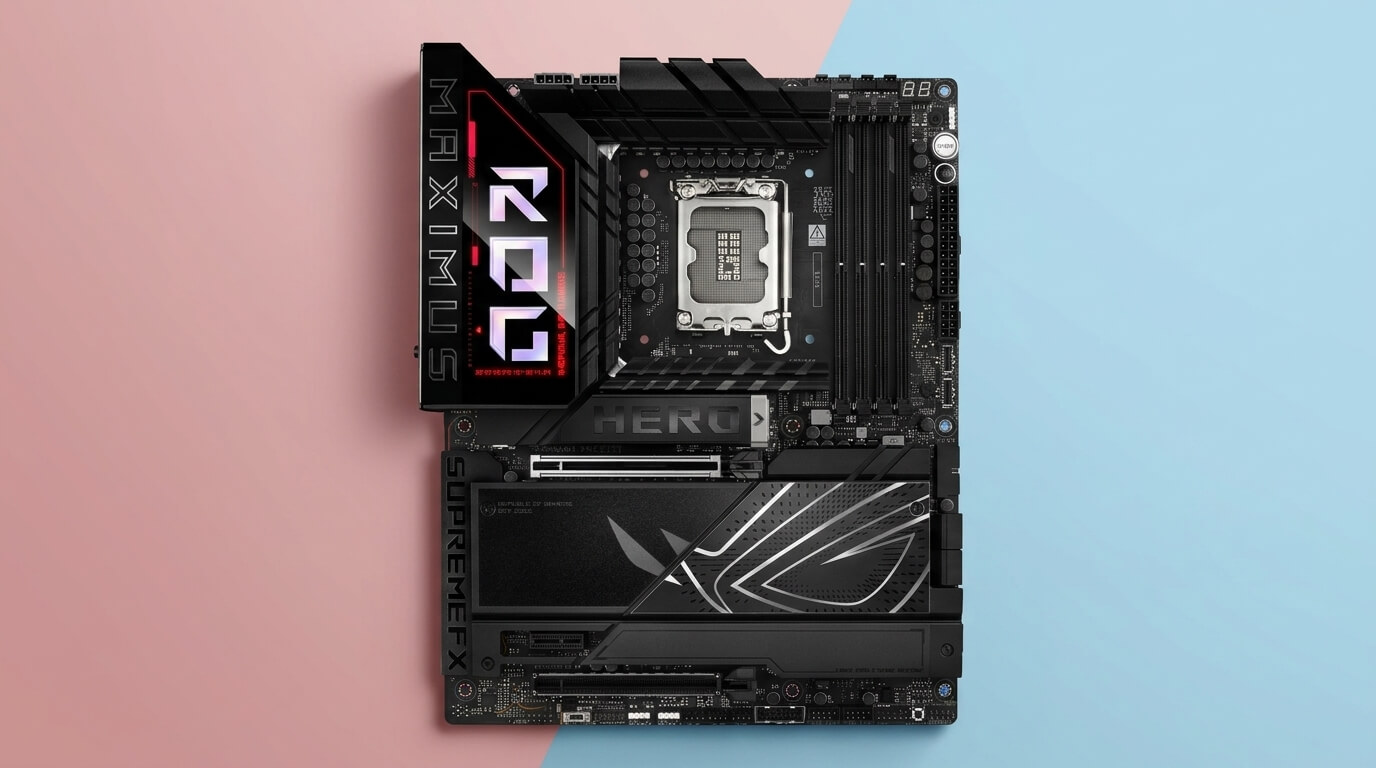
ASUS ROG Maximus Z890 Hero
Pricing and availability on Amazon
Pros & cons
Strengths
- Six M.2 slots with three on PCIe 5.0 covers extensive Gen5 storage needs
- Thunderbolt 4 support adds high-speed peripheral connectivity
- SafeSlot and Q-Release Slim simplify GPU installation and removal
- AI Overclocking and AI Cooling II automate tuning for Core Ultra CPUs
Limitations
- Populating M.2_3 or M.2_4 drops the primary GPU slot to x8
- Single physical PCIe x16 slot limits multi-card expansion
- Premium ROG pricing sits above mainstream Z890 boards
Review notes
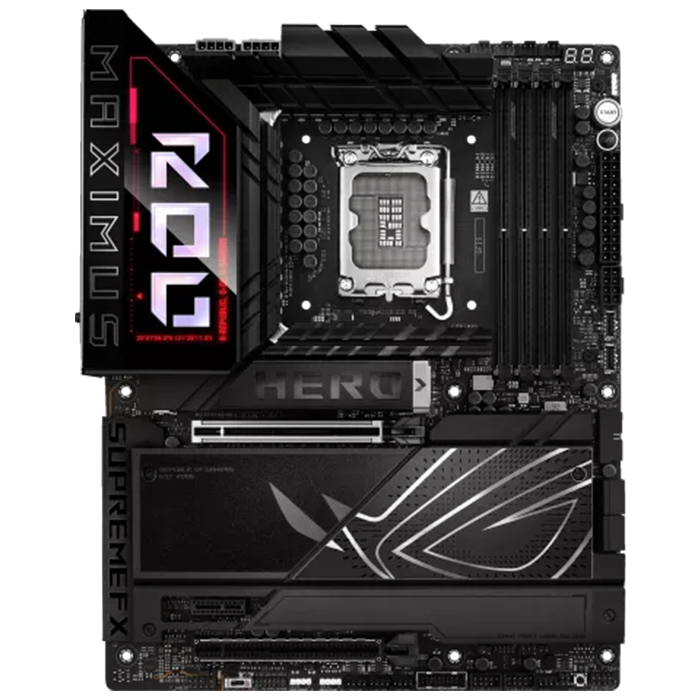
The ASUS ROG Maximus Z890 Hero is a high-end ATX motherboard for Intel’s LGA 1851 socket, built on the Z890 chipset for Intel Core Ultra 200 series (Series 2) processors. It uses a 22+2+1+2 power stage design with ProCool II connectors, giving it enough current capacity for a Core Ultra 9 285K running at stock or tuned power limits alongside an RTX 5080.
The primary PCIe 5.0 x16 slot uses ASUS SafeSlot reinforcement and Q-Release Slim for tool-free card removal, and it runs at full x16 bandwidth from the CPU unless the third or fourth M.2 slot is populated, which drops it to x8. For an RTX 5080 build that leaves the M.2_3 and M.2_4 slots open, the GPU keeps full PCIe 5.0 x16 bandwidth. The 22+2+1+2 VRM and AI Cooling II tuning keep a Core Ultra 9 285K stable under sustained multi-threaded loads while the RTX 5080 draws its 360 W independently from the PSU’s dedicated 12V-2×6 cable.
Compared with the ASRock Z890 Taichi Lite, the Maximus Z890 Hero offers a similar six-M.2 layout and Wi-Fi 7 networking, but adds Thunderbolt 4 and a stronger stated VRM current, positioning it above the Taichi Lite in price and target audience. Against the AM5 boards on this list, the Maximus Z890 Hero is the choice for builders committed to Intel Core Ultra 200 series rather than Ryzen.
Specs & configuration
| Specification | Details |
|---|---|
| Form factor | ATX |
| Socket / Chipset | LGA 1851 / Intel Z890 |
| CPU support | Intel Core Ultra 200 series (Series 2) |
| VRM | 22+2+1+2 power stages, 110A stages, ProCool II connectors |
| Memory | 4x DDR5 DIMM, up to 256GB, NitroPath DRAM Technology |
| PCIe slots | 1x PCIe 5.0 x16 (primary, SafeSlot reinforced) |
| M.2 storage | 6x M.2 total, 3x PCIe 5.0 x4, 3x PCIe 4.0 x4 |
| SATA | 4x SATA 6Gbps + SlimSAS connector |
| Networking | Wi-Fi 7, wired Ethernet, Bluetooth |
| USB | Thunderbolt 4, USB4, multiple USB 10Gbps ports |
| Audio | SupremeFX ALC4082 with ESS ES9219 DAC, Dolby Atmos |
| Extras | AI Overclocking, AI Cooling II, Polymo Lighting II |
ASRock X870E Taichi
Pricing and availability on Amazon
Pros & cons
Strengths
- 24+2+1, 105A VRM comfortably powers flagship Ryzen CPUs
- Two full PCIe 5.0 x16 slots, both CPU-connected
- EZ Release System simplifies removing a heavy RTX 5080
- Six SATA ports support extensive secondary storage
Limitations
- E-ATX footprint requires a case with matching standoffs
- Memory support tops out lower than some rival X870E boards
- Positioned above budget X870 boards in price for similar core gaming performance
Review notes
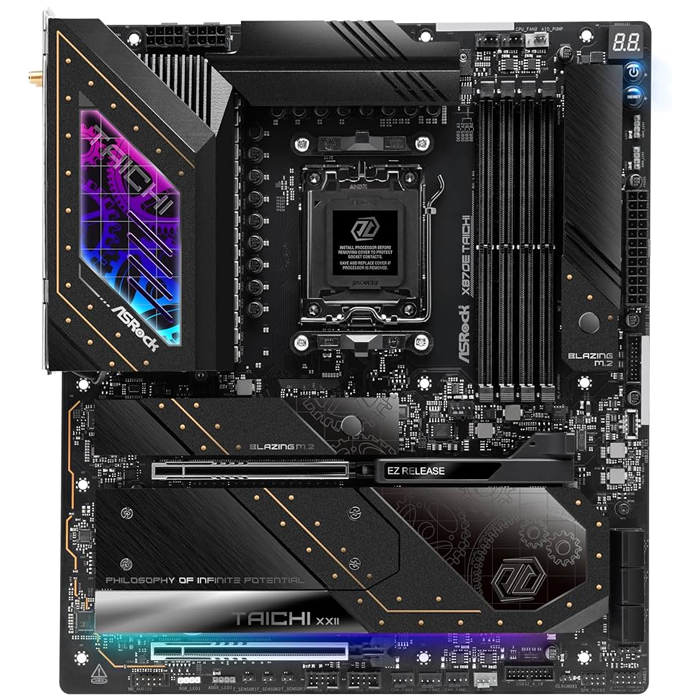
The ASRock X870E Taichi is a high-end E-ATX motherboard for the AMD AM5 platform, built on the X870E chipset for Ryzen 9000, 8000, and 7000 series processors. It uses a 24+2+1 phase design with 105A Smart Power Stages, giving it strong current delivery for flagship Ryzen CPUs paired with an RTX 5080.
Both PCIe 5.0 x16 slots connect to the CPU and are reinforced with stainless-steel plates, and the top slot includes ASRock’s EZ Release System for single-finger card removal, a practical feature given the RTX 5080’s weight and card length. The primary Blazing M.2 slot draws its Gen5 x4 lanes from the CPU independently of the graphics slot, so installing a Gen5 SSD does not reduce the GPU to x8. The 24+2+1, 105A VRM keeps a Ryzen 9 9950X or 9800X3D stable under sustained load while the RTX 5080 pulls power separately through its own PSU cable.
Who it suits
Compared with the MSI MEG X870E Godlike, the Taichi uses a slightly lower-rated VRM (105A versus 110A) and fewer total M.2 Gen5 slots, but it costs less and still covers every requirement of a single-GPU RTX 5080 build. Against the ASUS PRIME X870-P WiFi, the Taichi adds a second full-length PCIe 5.0 x16 slot and two additional SATA ports, features aimed at builders who want expansion room beyond a single graphics card.
Specs & configuration
| Specification | Details |
|---|---|
| Form factor | E-ATX |
| Socket / Chipset | AM5 / AMD X870E |
| CPU support | AMD Ryzen 9000 / 8000 / 7000 series |
| VRM | 24+2+1 phases, 105A SPS |
| Memory | 4x DDR5 DIMM, up to 192GB, 8200+ MT/s (OC) |
| PCIe slots | 2x PCIe 5.0 x16 (CPU) |
| M.2 storage | 1x Blazing M.2 Gen5 x4, 2x Hyper M.2 Gen4 x4, 1x additional Gen4 M.2 |
| SATA | 6x SATA 6Gbps |
| Networking | 5G LAN, Wi-Fi 7 |
| USB | USB4 (40Gbps), multiple USB 3.2 ports |
| Audio | Realtek ALC4082 with ESS SABRE9219 DAC |
| Extras | EZ Release PCIe slot, toolless M.2 heatsinks |
MSI MAG X870E Tomahawk WiFi
Pricing and availability on Amazon
Pros & cons
Strengths
- 14+2+1, 80A VRM with dual 8-pin power supports high-end Ryzen CPUs
- PCIe Steel Armor II reinforces the primary GPU slot
- Dual USB4 40Gbps Type-C ports on the rear I/O
- Competitive pricing relative to full X870E feature set
Limitations
- Single PCIe 5.0 x16 slot limits multi-card or riser configurations
- Secondary PCIe slots run at PCIe 3.0 x1 and PCIe 4.0 x4 only
- No integrated diagnostic display found on flagship boards
Review notes
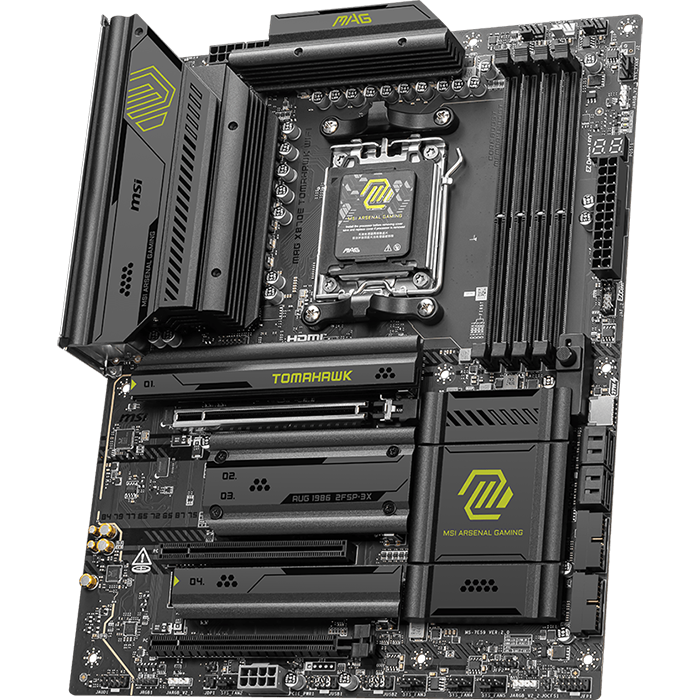
The MSI MAG X870E Tomahawk WiFi is a mainstream ATX motherboard for the AMD AM5 platform, built on the X870E chipset for Ryzen 9000, 8000, and 7000 series processors. It uses a 14 Duet Rail Power System with 80A Smart Power Stages, sized for high-end Ryzen CPUs without the premium cost of a flagship board.
The single PCIe 5.0 x16 slot connects to the CPU and runs the RTX 5080 at full bandwidth, with a steel-reinforced PCIe Steel Armor II slot to support the card’s weight. The 14+2+1, 80A VRM with dual 8-pin CPU power connectors handles a Ryzen 7 9800X3D or Ryzen 9 9900X without throttling under sustained gaming or content-creation loads, though it carries less headroom than the 24-phase flagship boards for extreme all-core overclocking.
Compared with the ASUS PRIME X870-P WiFi, the Tomahawk WiFi offers a higher-rated VRM (80A versus the PRIME’s shared 80A DrMOS stages across fewer total phases) and dual 40Gbps USB4 ports, making it the stronger mainstream choice for CPU-intensive workloads alongside the GPU. Against the flagship MSI MEG X870E Godlike, the Tomahawk WiFi drops the second PCIe 5.0 slot, the LCD dashboard, and dual high-speed LAN, but it retains the PCIe 5.0 x16 slot and Gen5 M.2 storage an RTX 5080 build actually uses.
Specs & configuration
| Specification | Details |
|---|---|
| Form factor | ATX |
| Socket / Chipset | AM5 / AMD X870E |
| CPU support | AMD Ryzen 9000 / 8000 / 7000 series |
| VRM | 14+2+1 phases, 80A SPS, dual 8-pin CPU power |
| Memory | 4x DDR5 DIMM, 8400+ MT/s (OC) |
| PCIe slots | 1x PCIe 5.0 x16 (CPU), 1x PCIe 3.0 x1, 1x PCIe 4.0 x4 (chipset) |
| M.2 storage | Multiple Gen5 and Gen4 M.2 slots with Shield Frozr cooling |
| Networking | 5G LAN, Wi-Fi 7 |
| USB | USB4 (40Gbps) Type-C ports, USB 10Gbps ports |
| Audio | Realtek ALC4080, 7.1-channel |
| Extras | EZ DIY features, server-grade 8-layer PCB |
ASUS PRIME X870-P WiFi
Pricing and availability on Amazon
Pros & cons
Strengths
- 14+2+1, 80A DrMOS VRM supports high-end Ryzen CPUs reliably
- Full PCIe 5.0 x16 GPU slot with Q-Release for tool-free removal
- USB4 40Gbps connectivity included at a mainstream price point
- Q-LED Core simplifies POST troubleshooting
Limitations
- X870 chipset offers fewer SATA ports than X870E alternatives
- Only two M.2 slots run at PCIe 4.0 x4 or faster
- Single PCIe x16 slot limits expansion beyond the primary GPU
Review notes
The ASUS PRIME X870-P WiFi is a mainstream ATX motherboard for the AMD AM5 platform, built on the X870 chipset for Ryzen 9000, 8000, and 7000 series processors. It uses a 14+2+1 arrangement of 80A DrMOS power stages, providing solid power delivery for high-core-count Ryzen CPUs at a lower price point than X870E boards.
The single PCIe 5.0 x16 slot draws its lanes from the CPU and runs the RTX 5080 at full x16 bandwidth independent of the board’s M.2 configuration. The 14+2+1, 80A DrMOS VRM sustains a Ryzen 7 9700X or Ryzen 9 9900X at stock and moderately overclocked settings, keeping voltage stable under the GPU’s peak power draws even though CPU and GPU pull from the same PSU rails. The Digi+ VRM module adjusts switching frequency automatically to maintain efficiency under load.
Compared with the MSI MAG X870E Tomahawk WiFi, the PRIME X870-P WiFi uses the non-E X870 chipset, which reduces total chipset-level PCIe lanes and SATA ports (2 versus 4), but it retains the same PCIe 5.0 x16 graphics slot and Gen5 M.2 storage that matter most for an RTX 5080 build. Against the ASRock X870E Taichi, the PRIME X870-P WiFi gives up the second PCIe 5.0 x16 slot and two SATA ports in exchange for a lower price, a reasonable trade for a single-GPU system.
Specs & configuration
| Specification | Details |
|---|---|
| Form factor | ATX |
| Socket / Chipset | AM5 / AMD X870 |
| CPU support | AMD Ryzen 9000 / 8000 / 7000 series |
| VRM | 14(80A)+2(80A)+1(80A) DrMOS power stages |
| Memory | 4x DDR5 DIMM, AEMP and EXPO support |
| PCIe slots | 1x PCIe 5.0 x16 (CPU) |
| M.2 storage | 4x M.2 total: 1x PCIe 5.0 x4, 2x PCIe 4.0 x4, 1x PCIe 3.0 |
| SATA | 2x SATA 6Gbps |
| Networking | Realtek 2.5Gb Ethernet, Wi-Fi 7 |
| USB | USB4 (40Gbps) Type-C, USB 10Gbps Type-C and Type-A |
| Extras | Q-Latch M.2 retention, Q-LED Core, BIOS FlashBack |
ASRock Z890 Taichi Lite
Pricing and availability on Amazon
Pros & cons
Strengths
- Two PCIe 5.0 x16 slots, both wired directly to the CPU
- 20+1+2+1+1, 110A VRM handles flagship Core Ultra CPUs
- Dual Thunderbolt 4 ports on the rear I/O
- Lower price than the full Z890 Taichi with the same core PCB
Limitations
- Fewer onboard RGB and cosmetic extras than the standard Z890 Taichi
- Lacks the SlimSAS connector found on some Z890 competitors
- 20-phase VRM sits below the 22-phase count of premium Z890 boards
Review notes
The ASRock Z890 Taichi Lite is a high-end ATX motherboard for Intel’s LGA 1851 socket, built on the Z890 chipset for Intel Core Ultra 200 series processors. It shares its power delivery and PCB layout with the standard Z890 Taichi but uses a 20+1+2+1+1 phase arrangement with 110A SPS stages in a more restrained design.
Both PCIe 5.0 x16 slots connect directly to the CPU, so the RTX 5080 runs at full x16 bandwidth in the primary slot regardless of M.2 configuration. The 20+1+2+1+1, 110A VRM keeps a Core Ultra 9 285K stable under sustained loads, and ASRock’s Intel 200S Boost BIOS profile lets builders extract additional performance from supported Core Ultra CPUs without manual voltage tuning. Dual Thunderbolt 4 ports add high-bandwidth peripheral support that the AM5 boards on this list do not include.
Compared with the ASUS ROG Maximus Z890 Hero, the Taichi Lite offers two full PCIe 5.0 x16 slots instead of one, along with dual Thunderbolt 4 ports, at a lower price than the ROG board. It gives up the Maximus Hero’s AI Cooling and AI Overclocking software suite and its SlimSAS connector. Against the AM5 boards on this list, the Z890 Taichi Lite is the direct choice for builders standardizing on Intel Core Ultra 200 series rather than AMD Ryzen.
Specs & configuration
| Specification | Details |
|---|---|
| Form factor | ATX |
| Socket / Chipset | LGA 1851 / Intel Z890 |
| CPU support | Intel Core Ultra 200 series (Series 2) |
| VRM | 20+1+2+1+1 phases, 110A SPS for VCore |
| Memory | 4x DDR5 DIMM, Memory OC Shield |
| PCIe slots | 2x PCIe 5.0 x16 (CPU) |
| M.2 storage | 6x M.2 total, including 1x Blazing Gen5 x4 and multiple Gen4 x4 |
| SATA | 4x SATA 6Gbps |
| Networking | 5G LAN + 2.5G LAN, Wi-Fi 7 |
| USB | Dual Thunderbolt 4 / USB4 Type-C ports |
| Audio | Realtek ALC4082 with ESS SABRE9219 DAC |
| Extras | 20K Black Caps capacitors, toolless M.2 design |
How to Choose a Motherboard For RTX 5080
The right motherboard for an RTX 5080 has a PCIe 5.0 x16 slot wired directly to the CPU, a VRM rated for the paired processor’s full power draw, and enough M.2 Gen5 storage to match the build’s performance tier. These three factors determine GPU bandwidth, system stability under combined CPU and GPU load, and storage speed, and they matter more than secondary features such as RGB lighting or audio codecs.
PCIe slot wiring affects GPU bandwidth directly. A PCIe 5.0 x16 slot connected to the CPU delivers full bandwidth to the RTX 5080, while a slot that shares lanes with an M.2 socket can drop to x8 when that storage slot is populated. Builders who plan to use every M.2 slot should confirm the board’s lane-sharing table before assuming the graphics slot stays at x16.
VRM capacity should match the CPU, not the GPU. The RTX 5080 powers itself through its own 12V-2×6 PSU connector, so the motherboard’s VRM only needs to support the processor. A 14-phase, 80A-class VRM covers most mid-range and high-end CPUs at stock settings, while flagship chips running sustained all-core workloads benefit from 20-phase or higher VRMs with 105A or 110A stages.
Platform choice depends on the CPU, not the GPU. AM5 X870E and X870 boards support Ryzen 9000, 8000, and 7000 series processors, while LGA 1851 Z890 boards support Intel Core Ultra 200 series processors. The RTX 5080 performs identically across both platforms when paired with a comparable CPU, so the choice between AMD and Intel motherboards should follow CPU preference rather than GPU compatibility.
Storage and I/O needs scale with the rest of the build. Builders who plan multiple PCIe 5.0 M.2 SSDs need a board with several Gen5-rated slots, such as the MSI MEG X870E Godlike or ASUS ROG Maximus Z890 Hero. Builders running a single fast SSD alongside the RTX 5080 can save money with a mainstream board like the MSI MAG X870E Tomahawk WiFi or ASUS PRIME X870-P WiFi, both of which still include one PCIe 5.0 M.2 slot.
Finally, confirm the PSU and case can support the pairing. The RTX 5080’s 360 W rating and 16-pin 12V-2×6 connector call for an 850 W or higher ATX 3.0/3.1 power supply, and the motherboard’s form factor, whether ATX or E-ATX, must match the case’s mounting standoffs and clearance around the primary PCIe slot for the card’s length and cooler height.
JOIN THE CONVERSATION
Leave a comment
Have a question or something to add? Share it with our editorial team. Comments are reviewed privately and are not published automatically.