
Table of Contents
The RTX 5070 and RTX 5070 Ti are NVIDIA Blackwell-generation graphics cards built on a PCI Express 5.0 x16 interface. The RTX 5070 has a 250 W total graphics power rating with a 650 W recommended system power supply, while the RTX 5070 Ti has a 300 W rating with a 750 W recommended system power supply. Both cards use a 16-pin 12V-2×6 power connector or a dual 8-pin adapter, depending on the board partner model. A motherboard does not power the GPU directly, but it determines the PCIe slot bandwidth, physical card clearance, CPU power delivery, and storage layout that the graphics card operates within.
Pairing either card with a modern AM5 or LGA 1851 motherboard requires attention to four areas: PCIe slot generation and lane allocation, VRM capacity for the paired CPU, M.2 storage layout, and I/O connectivity such as Wi-Fi 7 and 2.5 GbE or faster networking. A PCIe 5.0 x16 slot accepts the RTX 5070 and RTX 5070 Ti at full bandwidth and remains backward compatible with PCIe 4.0 and PCIe 3.0 cards. A PCIe 4.0 x16 slot also runs these two cards without a measurable frame-rate penalty, since neither GPU saturates the bandwidth of a 16-lane Gen 4 link.
This article reviews six motherboards suited to systems built around the RTX 5070 and RTX 5070 Ti: three AMD AM5 boards (MSI MAG B850 Tomahawk MAX WiFi, ASUS Prime X870-P WiFi, ASRock X870E Taichi, and ASUS TUF Gaming B850-Plus WiFi) and two Intel LGA 1851 boards (MSI MEG Z890 ACE and ASRock Z890 Taichi Lite). Each entry covers the chipset, VRM, memory support, PCIe and M.2 layout, networking, and how the board’s PCIe configuration and cooling apply to an RTX 5070 or RTX 5070 Ti build.
Each board is compared against the others in this list on VRM strength, PCIe lane allocation, M.2 slot count, and networking, since these four factors most directly affect a gaming or content-creation build around the RTX 5070 family. Pricing reflects US retail figures available at the time of writing and varies by region and retailer.
THE SHORTLIST
This guide, at a glance
Compare the products covered below, then explore the strengths, limitations, and specifications that matter to you.
 Check current priceView on Amazon: MSI MAG B850 Tomahawk MAX WiFi (opens in a new tab)
 Check current priceView on Amazon: ASUS Prime X870-P WiFi (opens in a new tab)
 Check current priceView on Amazon: ASRock X870E Taichi (opens in a new tab)
 Check current priceView on Amazon: ASUS TUF Gaming B850-Plus WiFi (opens in a new tab)
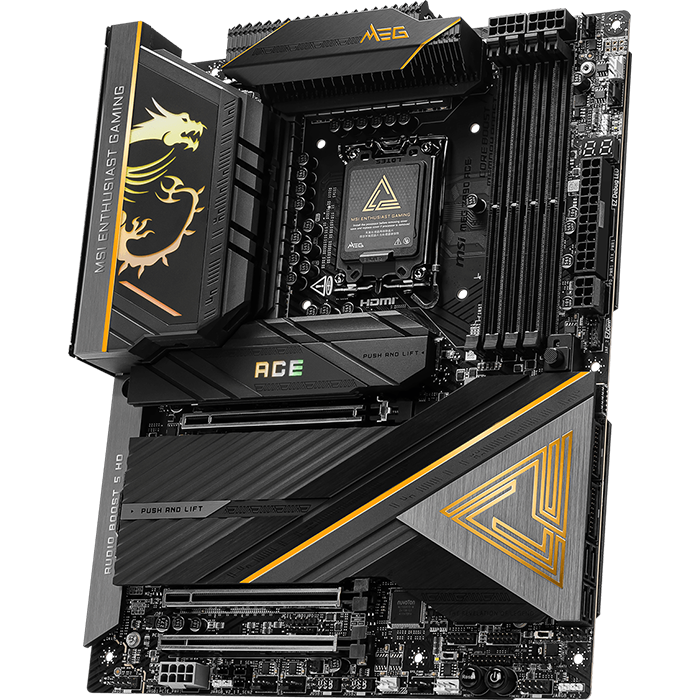 Check current priceView on Amazon: MSI MEG Z890 ACE (opens in a new tab)
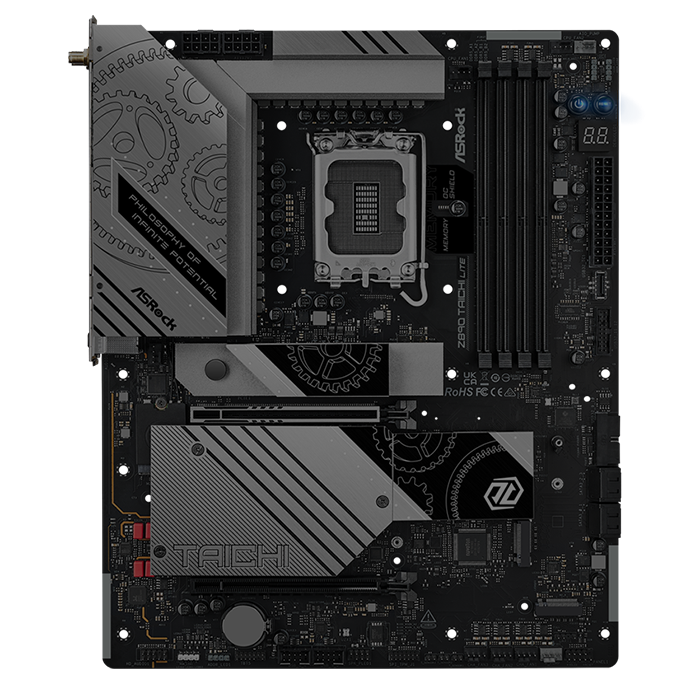 Check current priceView on Amazon: ASRock Z890 Taichi Lite (opens in a new tab)
Purchase links open Amazon. Confirm the exact model, price, availability, and seller terms before ordering.
Best Motherboards for Nvidia RTX 5070 & 5070 Ti Graphics Cards
MSI MAG B850 Tomahawk MAX WiFi
Pricing and availability on Amazon
Pros & cons
Strengths
- Its 14+2+1 80A SPS VRM supports flagship Ryzen 9000 processors effectively.
- Two PCIe 5.0 M.2 slots support dual high-speed NVMe drives.
- 5GbE and WiFi 7 provide strong networking for its price.
Limitations
- Only three rear USB-C ports limit high-speed connectivity options.
- It lacks USB4, requiring pricier alternatives for 40Gbps USB4 connectivity.
Review notes
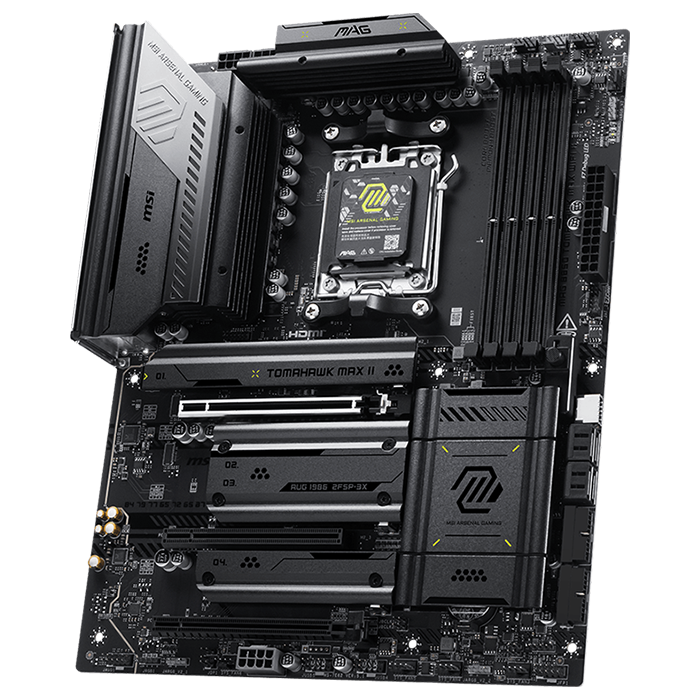
The MSI MAG B850 Tomahawk MAX WiFi is an AMD B850 chipset motherboard built on the AM5 socket. It supports AMD Ryzen 9000, 8000, and 7000 series desktop processors and uses an 8-layer, 2 oz copper PCB rated for server-grade signal integrity.
Power delivery uses a 14+2+1 Duet Rail Power System with 80 A SPS stages and dual 8-pin CPU power connectors, supported by Core Boost circuitry and an extended Frozr Guard heatsink with 7 W/mK MOSFET thermal pads. This VRM configuration handles Ryzen 9000-series processors, including the Ryzen 7 9800X3D and Ryzen 9 9950X, without throttling under sustained loads. Memory support covers dual-channel DDR5 at speeds up to 8400+ MT/s (OC) across four DIMM slots, with a maximum capacity of 256 GB.
Storage includes four M.2 slots, two of which run at PCIe 5.0 speeds, alongside three PCIe expansion slots. Networking is handled by 5 Gigabit Ethernet and Wi-Fi 7, and the rear I/O includes three USB Type-C ports. The board ships with EZ DIY features such as EZ M.2 Shield Frozr II, EZ M.2 Clip II, and EZ PCIe Release, which speed up SSD and graphics card installation.
For a system built around the RTX 5070 or RTX 5070 Ti, the primary PCIe 5.0 x16 slot accepts either card at full bandwidth and includes MSI’s EZ PCIe Release latch for tool-free removal. The dual 8-pin CPU power connectors give the VRM enough headroom to pair the card with a high-core-count Ryzen 9000 processor without the CPU becoming a bottleneck in CPU-limited titles. The two PCIe 5.0 M.2 slots let a builder install a fast NVMe boot drive and a second high-speed game drive without competing for chipset bandwidth with the GPU slot.
Compared with the ASUS TUF Gaming B850-Plus WiFi, the MAG B850 Tomahawk MAX WiFi offers one more M.2 slot and 5 GbE networking instead of 2.5 GbE, while the TUF board counters with a wider PCIe expansion slot count. Against the ASUS Prime X870-P WiFi, the Tomahawk MAX costs less and matches its 14+2+1 VRM phase count, though the Prime X870-P adds USB4 ports that the B850 board lacks.
Specs & configuration
| Specification | MSI MAG B850 Tomahawk MAX WiFi |
|---|---|
| Chipset | AMD B850 |
| Socket | AM5 (LGA 1718) |
| Form Factor | ATX |
| CPU Support | Ryzen 9000 / 8000 / 7000 series |
| VRM | 14+2+1 Duet Rail Power System, 80 A SPS |
| Memory | 4x DDR5 DIMM, up to 8400+ MT/s (OC), 256 GB max |
| PCIe Slots | 3 (PCIe 5.0 x16 primary) |
| M.2 Slots | 4 total (2x PCIe 5.0) |
| Networking | 5 GbE, Wi-Fi 7 |
| Rear USB-C | 3 ports |
| Approx. Price | $200–$230 |
ASUS Prime X870-P WiFi
Pricing and availability on Amazon
Pros & cons
Strengths
- Independent M.2 routing maintains full x16 GPU bandwidth with all M.2 slots populated.
- Dual 40Gbps USB4 ports provide excellent connectivity at a mainstream price.
- Q-Release, Q-Antenna, and the pre-mounted I/O shield simplify PC assembly.
Limitations
- Its 2.5GbE networking is slower than competing 5GbE motherboard options.
- It has only one PCIe 5.0 slot suitable for graphics cards.
Review notes
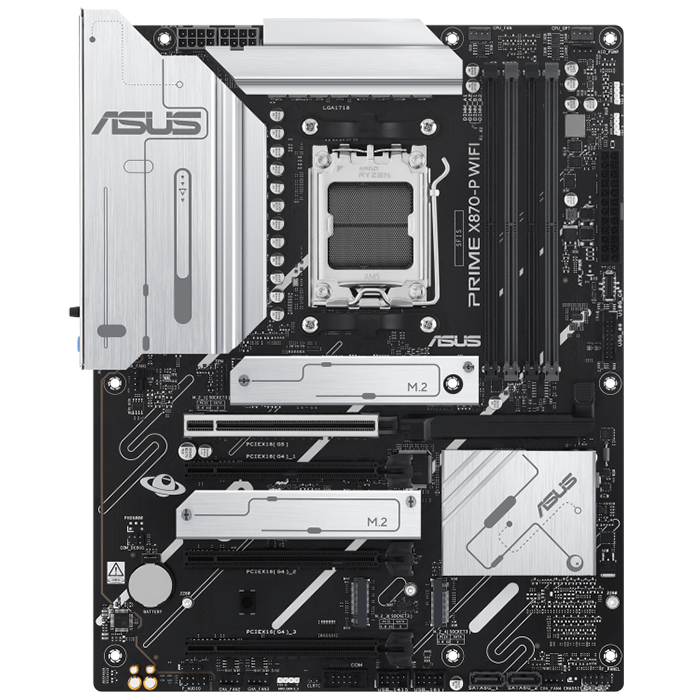
The ASUS Prime X870-P WiFi is an AMD X870 chipset motherboard on the AM5 socket, supporting Ryzen 9000, 8000, and 7000 series processors. It uses an 8-layer PCB with a Digi+ digital VRM design rated at 14+2+1 phases and 80 A DrMOS power stages, delivering real-time voltage droop control.
Memory support includes dual-channel DDR5 with AMD EXPO profile support and ASUS Enhanced Memory Profile (AEMP) for modules without EXPO. The board offers four M.2 slots in total: one PCIe 5.0 x4 slot rated at 128 Gbps, two PCIe 4.0 x4 slots rated at 64 Gbps, and one PCIe 3.0 slot. Unlike many competing X870 boards, the Prime X870-P WiFi routes these M.2 lanes independently of the primary graphics slot, so populating the M.2 slots does not reduce the primary PCIe 5.0 x16 slot to x8 mode.
Connectivity includes Wi-Fi 7 with Multi-Link Operation across the 2.4, 5, and 6 GHz bands, Realtek 2.5 Gb Ethernet, and dual USB4 ports delivering 40 Gbps bidirectional bandwidth with support for two external 4K displays. DIY features include Q-Antenna, PCIe Slot Q-Release, M.2 Q-Latch, and a pre-mounted I/O shield.
For an RTX 5070 or RTX 5070 Ti build, the independent M.2 lane routing means a builder can populate the PCIe 5.0 M.2 slot with a fast NVMe drive without dropping the graphics card to x8 mode, preserving full PCIe 5.0 x16 bandwidth to the GPU. The SafeSlot-reinforced PCIe 5.0 x16 slot adds mechanical support for the card’s weight, and the dual USB4 ports let a builder run a high-refresh external display or fast external storage alongside the GPU’s own outputs.
Against the MSI MAG B850 Tomahawk MAX WiFi, the Prime X870-P WiFi adds USB4 and X870-tier chipset features at a similar VRM phase count, though the Tomahawk MAX includes faster 5 GbE networking. Against the ASRock X870E Taichi, the Prime X870-P WiFi is the more budget-oriented choice, trading dual PCIe 5.0 x16 slots and a heavier VRM for a lower price.
Specs & configuration
| Specification | ASUS Prime X870-P WiFi |
|---|---|
| Chipset | AMD X870 |
| Socket | AM5 |
| Form Factor | ATX |
| CPU Support | Ryzen 9000 / 8000 / 7000 series |
| VRM | 14+2+1, 80 A DrMOS |
| Memory | 4x DDR5 DIMM, EXPO support |
| PCIe Slots | 1x PCIe 5.0 x16 (full x16, independent of M.2) |
| M.2 Slots | 4 total (1x PCIe 5.0, 2x PCIe 4.0, 1x PCIe 3.0) |
| Networking | 2.5 GbE, Wi-Fi 7 |
| Rear USB | 2x USB4 (40 Gbps) |
| Approx. Price | $165–$190 |
ASRock X870E Taichi
Pricing and availability on Amazon
Pros & cons
Strengths
- It offers two full PCIe 5.0 x16 slots for multi-card configurations.
- Its 24+2+1 110A VRM supports flagship Ryzen CPUs under sustained overclocking.
- Dual USB4 and ten Type-A ports provide extensive connectivity.
Limitations
- At $449, it costs significantly more than several competing motherboards.
- Its E-ATX size requires a compatible case with sufficient clearance.
Review notes
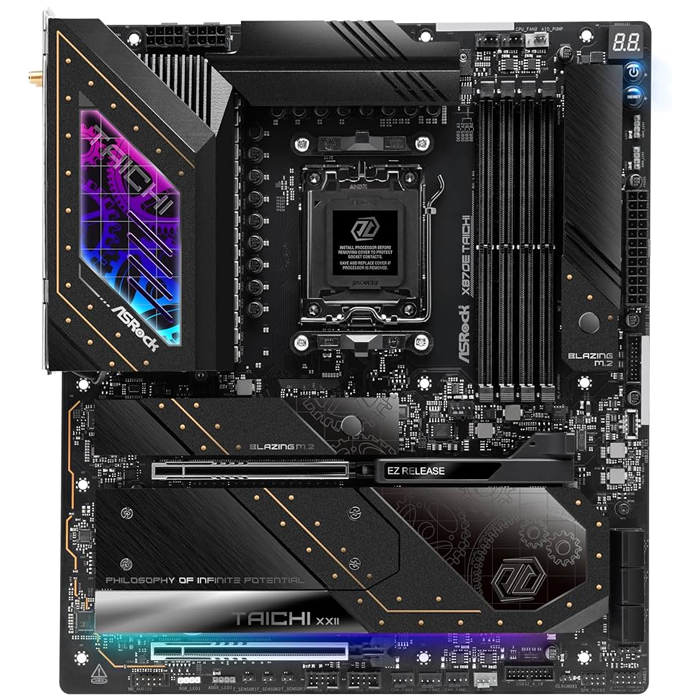
The ASRock X870E Taichi is an AMD X870E chipset motherboard on the AM5 socket, built in the E-ATX form factor and supporting Ryzen 9000 and 7000 series processors. It carries a 24+2+1 phase VRM using 110 A SPS Dr.MOS stages, controlled by a Renesas RAA229130 PWM controller, on an 8-layer, 2 oz copper server-grade PCB.
Memory support spans four DDR5 DIMMs at speeds up to 8200+ MT/s. Storage includes four M.2 slots, one rated for PCIe 5.0 and three for PCIe 4.0, plus six SATA ports. The board includes two full-length PCIe 5.0 x16 slots, giving it the most PCIe 5.0 graphics bandwidth of any board in this comparison. Audio runs through a Realtek ALC4082 codec paired with an ESS Sabre9219 DAC. Networking combines 5 GbE with Wi-Fi 7, and the rear I/O includes dual USB4 Type-C ports (40 Gbps) alongside ten additional USB Type-A ports.
Paired with an RTX 5070 or RTX 5070 Ti, the X870E Taichi’s primary PCIe 5.0 x16 slot runs the card at full bandwidth, and the second PCIe 5.0 x16 slot allows a capture card, additional storage controller, or a second GPU for compute workloads without displacing the primary card. The 24+2+1 VRM and active fan-assisted VRM cooling give the board enough sustained power delivery to pair the GPU with an overclocked Ryzen 9 9950X or 9800X3D without CPU-side throttling in demanding titles.
Who it suits
Compared with the ASUS Prime X870-P WiFi, the X870E Taichi offers a substantially stronger VRM, a second PCIe 5.0 x16 slot, and 5 GbE networking, at roughly double the price. Compared with the MSI MAG B850 Tomahawk MAX WiFi, the Taichi adds a second full PCIe 5.0 slot, two additional SATA ports, and USB4, making it the choice for builders who need maximum expansion rather than value.
Specs & configuration
| Specification | ASRock X870E Taichi |
|---|---|
| Chipset | AMD X870E |
| Socket | AM5 |
| Form Factor | E-ATX |
| CPU Support | Ryzen 9000 / 7000 series |
| VRM | 24+2+1, 110 A SPS Dr.MOS |
| Memory | 4x DDR5 DIMM, up to 8200+ MT/s |
| PCIe Slots | 2x PCIe 5.0 x16 (full x16 each) |
| M.2 Slots | 4 total (1x PCIe 5.0, 3x PCIe 4.0) |
| SATA | 6 ports |
| Networking | 5 GbE, Wi-Fi 7 |
| Rear USB | 2x USB4 (40 Gbps) + 10x USB Type-A |
| Approx. Price | $449 |
ASUS TUF Gaming B850-Plus WiFi
Pricing and availability on Amazon
Pros & cons
Strengths
- It offers four PCIe expansion slots for capture, audio, and other cards.
- Its 57°C VRM peak temperature provides headroom for higher-TDP processors.
- Military-grade components provide durability and support long-term system reliability.
Limitations
- Three M.2 slots provide less storage expansion than competing motherboards.
- Its 2.5GbE networking is slower than competing 5GbE alternatives.
Review notes
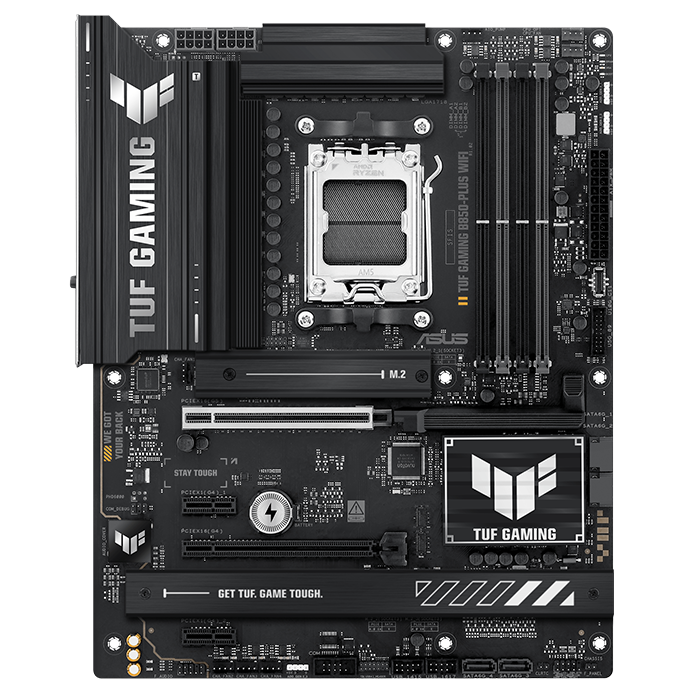
The ASUS TUF Gaming B850-Plus WiFi is an AMD B850 chipset ATX motherboard for the AM5 socket, supporting Ryzen 9000, 8000, and 7000 series processors. It uses a 14+2+1 phase VRM with 80 A DrMOS stages, ASUS TUF military-grade component certification, and brushed-metal VRM heatsinks. Independent lab testing recorded a peak VRM temperature of 57°C during a ten-minute Cinebench R24 loop, placing it mid-pack among tested B850 boards.
Memory support covers four DDR5 DIMMs at up to 192 GB and speeds up to 8000+ MT/s when overclocked. The board includes three M.2 slots: one PCIe 5.0 x4 primary slot and two PCIe 4.0 x4 slots, alongside four SATA ports. Expansion includes a PCIe 5.0 x16 primary slot, a PCIe 4.0 x16 slot (running at x4 mode), and two PCIe 4.0 x1 slots, giving the TUF Gaming B850-Plus WiFi four PCIe expansion slots in total, more than most other B850 boards. Networking runs on Wi-Fi 7 and Realtek 2.5 Gb Ethernet, with a 20 Gbps rear USB-C port and a 10 Gbps front-panel USB-C header.
For an RTX 5070 or RTX 5070 Ti build, the SafeSlot-reinforced PCIe 5.0 x16 slot supports the card’s full weight and bandwidth, while the additional PCIe 4.0 x1 and x16 slots leave room for a capture card or sound card without touching the GPU slot. The primary PCIe 5.0 M.2 slot suits a fast NVMe boot drive, and the 57°C measured VRM ceiling indicates enough thermal headroom to pair the GPU with a mid-range to upper-tier Ryzen CPU under normal gaming loads.
Compared with the MSI MAG B850 Tomahawk MAX WiFi, the TUF Gaming B850-Plus WiFi trades one M.2 slot and 5 GbE networking for an extra PCIe expansion slot, at a somewhat higher retail price. Compared with the ASUS Prime X870-P WiFi, the TUF board runs the same B850 chipset tier below X870 but shares an identical 14+2+1 80 A VRM design.
Specs & configuration
| Specification | ASUS TUF Gaming B850-Plus WiFi |
|---|---|
| Chipset | AMD B850 |
| Socket | AM5 |
| Form Factor | ATX |
| CPU Support | Ryzen 9000 / 8000 / 7000 series |
| VRM | 14+2+1, 80 A DrMOS (57°C peak, tested) |
| Memory | 4x DDR5 DIMM, up to 192 GB, 8000+ MT/s (OC) |
| PCIe Slots | 4 (1x PCIe 5.0 x16 primary) |
| M.2 Slots | 3 total (1x PCIe 5.0) |
| SATA | 4 ports |
| Networking | 2.5 GbE, Wi-Fi 7 |
| Rear USB-C | 20 Gbps |
| Approx. Price | $227 |
MSI MEG Z890 ACE
Pricing and availability on Amazon
Pros & cons
Strengths
- It offers 10GbE networking, providing the fastest wired connectivity in this comparison.
- Dual Thunderbolt 4 supports 8K displays and daisy-chained peripherals.
- Five M.2 slots provide the most native storage expansion here.
Limitations
- Its premium pricing makes it one of the more expensive boards.
- It supports only LGA1851 processors and is incompatible with AMD Ryzen CPUs.
Review notes
The MSI MEG Z890 ACE is an Intel Z890 chipset ATX motherboard for the LGA 1851 socket, supporting Intel Core Ultra Series 2 processors. It uses a 24+2+1+1 Duet Rail Power System rated at 110 A SPS with dual 8-pin CPU power connectors and an OC Engine, backed by an 8-layer, 2 oz copper PCB and a Frozr Guard cooling array with 9 W/mK thermal pads.
Memory support covers four DDR5 DIMMs at up to 9200+ MT/s (OC), with a maximum capacity of 256 GB and support for CUDIMM modules. Storage includes five M.2 slots, of which one to two run at PCIe 5.0 speeds and the remainder at PCIe 4.0, alongside four SATA 6 Gbps ports. Expansion includes two PCIe 5.0 x16 slots and one PCIe 4.0 x4 slot. Networking combines Marvell 10 Gigabit Ethernet with Intel Killer Wi-Fi 7, and the rear I/O includes dual Thunderbolt 4 ports delivering 40 Gbps with 8K display support and daisy-chain capability, plus an ALC4082 audio codec paired with an ESS Sabre DAC.
Paired with an RTX 5070 or RTX 5070 Ti, the primary PCIe 5.0 x16 slot delivers full Gen5 bandwidth to the GPU, and the 24+2+1+1 110 A VRM comfortably powers a Core Ultra 9 285K or similar flagship CPU without throttling during sustained gaming or rendering sessions. The dual Thunderbolt 4 ports give a builder 8K external display output or high-speed external storage independent of the GPU’s own DisplayPort and HDMI outputs, useful for creators running the RTX 5070 Ti alongside a secondary monitor setup.
Compared with the ASRock Z890 Taichi Lite, the MEG Z890 ACE offers 10 GbE networking versus dual 5 GbE/2.5 GbE, and a marginally stronger 110 A VRM design, but includes one fewer M.2 slot. Compared with the AM5 boards in this comparison, the MEG Z890 ACE targets the Intel platform exclusively and commands a higher price reflecting its Thunderbolt 4 and 10 GbE inclusion.
Specs & configuration
| Specification | MSI MEG Z890 ACE |
|---|---|
| Chipset | Intel Z890 |
| Socket | LGA 1851 |
| Form Factor | ATX |
| CPU Support | Intel Core Ultra Series 2 |
| VRM | 24+2+1+1 Duet Rail, 110 A SPS |
| Memory | 4x DDR5 DIMM, up to 9200+ MT/s (OC), 256 GB max |
| PCIe Slots | 2x PCIe 5.0 x16 + 1x PCIe 4.0 x4 |
| M.2 Slots | 5 total (1–2x PCIe 5.0) |
| SATA | 4 ports |
| Networking | 10 GbE (Marvell), Wi-Fi 7 |
| Thunderbolt | 2x Thunderbolt 4 (40 Gbps) |
| Approx. Price | $500–$550 |
ASRock Z890 Taichi Lite
Pricing and availability on Amazon
Pros & cons
Strengths
- It provides six native M.2 slots for extensive NVMe storage.
- Dual LAN combines 5GbE and 2.5GbE for flexible networking.
- Its 56°C VRM peak matches the more expensive MEG Z890 ACE.
Limitations
- It has only one PCIe 5.0 x16 slot for graphics.
- Its secondary 2.5GbE port is slower than the MEG Z890 ACE's 10GbE.
Review notes
The ASRock Z890 Taichi Lite is an Intel Z890 chipset ATX motherboard for the LGA 1851 socket, supporting Intel Core Ultra Series 2 processors. It uses a 20+1+2+1+1 phase VRM with 110 A SPS stages for VCore, driven by a Renesas RAA229130 PWM controller, on an 8-layer, 2 oz copper server-grade low-loss PCB with an 8+8 pin CPU power configuration.
Memory support covers four DDR5 DIMMs at speeds up to 9600 MT/s with a maximum capacity of 256 GB. Storage is the most extensive in this comparison at six M.2 slots, one running at PCIe 5.0 and five at PCIe 4.0, alongside four SATA ports. Expansion includes a PCIe 5.0 x16 slot for the graphics card. Networking pairs 5 GbE with 2.5 GbE for dual-LAN configurations, along with Wi-Fi 7 supporting the full 320 MHz channel width. The rear I/O includes dual Thunderbolt 4/USB4 Type-C ports at 40 Gbps, and audio runs through a Realtek ALC4082 codec. Independent testing recorded a peak VRM temperature of 56°C under sustained load.
For an RTX 5070 or RTX 5070 Ti build, the PCIe 5.0 x16 slot provides full Gen5 bandwidth, and the 20+1+2+1+1 110 A VRM handles a Core Ultra 9 285K without power-delivery throttling, matching the measured thermal performance of the pricier MEG Z890 ACE. The six M.2 slots let a builder install multiple high-capacity NVMe drives for game libraries without touching SATA bandwidth, and dual LAN ports support NAS or streaming setups alongside the graphics card’s rendering workload.
Compared with the MSI MEG Z890 ACE, the Z890 Taichi Lite costs roughly $100–$150 less, adds one extra M.2 slot, and matches dual Thunderbolt 4 support, though it drops to a single PCIe 5.0 x16 slot and 5 GbE rather than 10 GbE networking. Compared with the ASRock X870E Taichi, the Z890 Taichi Lite is the Intel-platform counterpart, trading a second PCIe 5.0 x16 slot for two additional M.2 slots.
Specs & configuration
| Specification | ASRock Z890 Taichi Lite |
|---|---|
| Chipset | Intel Z890 |
| Socket | LGA 1851 |
| Form Factor | ATX |
| CPU Support | Intel Core Ultra Series 2 |
| VRM | 20+1+2+1+1, 110 A SPS (56°C peak, tested) |
| Memory | 4x DDR5 DIMM, up to 9600 MT/s, 256 GB max |
| PCIe Slots | 1x PCIe 5.0 x16 |
| M.2 Slots | 6 total (1x PCIe 5.0, 5x PCIe 4.0) |
| SATA | 4 ports |
| Networking | 5 GbE + 2.5 GbE, Wi-Fi 7 (320 MHz) |
| Thunderbolt | 2x Thunderbolt 4/USB4 (40 Gbps) |
| Approx. Price | $399.99 |
How to Choose a Motherboard For RTX 5070 & 5070 Ti
A motherboard for the RTX 5070 or RTX 5070 Ti should provide a PCIe 4.0 x16 slot or newer, a VRM matched to the paired CPU’s power draw, and enough M.2 slots to avoid lane-sharing conflicts with the graphics slot. Neither card saturates a 16-lane PCIe 4.0 link, so a PCIe 5.0 slot is a convenience for future upgrades rather than a requirement for current performance.
CPU platform is the first decision, since it determines the socket and, by extension, every board in this comparison. AMD Ryzen 9000 and 7000 series processors require an AM5 board such as the MSI MAG B850 Tomahawk MAX WiFi, ASUS Prime X870-P WiFi, ASRock X870E Taichi, or ASUS TUF Gaming B850-Plus WiFi. Intel Core Ultra Series 2 processors require an LGA 1851 board such as the MSI MEG Z890 ACE or ASRock Z890 Taichi Lite. Mixing a CPU generation with the wrong socket is not possible, so this choice narrows the field before any other specification matters.
VRM capacity should match the CPU rather than the GPU, since the motherboard’s power delivery circuitry supplies the processor, not the graphics card. A 14+2+1 80 A VRM, as found on the MAG B850 Tomahawk MAX WiFi and Prime X870-P WiFi, suits mid-range to upper-tier Ryzen CPUs such as the Ryzen 7 9800X3D. A 20+ phase, 110 A design, as found on the X870E Taichi, MEG Z890 ACE, and Z890 Taichi Lite, adds headroom for flagship CPUs such as the Ryzen 9 9950X or Core Ultra 9 285K under sustained overclocking.
M.2 slot count and lane routing affect whether the graphics slot retains full bandwidth once storage is installed. Boards such as the ASUS Prime X870-P WiFi route M.2 lanes independently of the primary PCIe 5.0 x16 slot, while some competing X870 boards reduce the primary slot to x8 mode when certain M.2 slots are populated. Builders planning two or more NVMe drives should confirm this lane-sharing behavior in the board’s manual before purchase, since it directly affects whether the RTX 5070 Ti retains full PCIe bandwidth alongside a fully populated storage array.
Networking and rear I/O requirements are the final consideration. A 2.5 GbE port with Wi-Fi 7, as found on the TUF Gaming B850-Plus WiFi and Prime X870-P WiFi, covers most gaming and general-use systems. Builders who stream, transfer large files over a local network, or run a home server alongside their gaming rig benefit from the 5 GbE or 10 GbE options on the MAG B850 Tomahawk MAX WiFi, X870E Taichi, Z890 Taichi Lite, or MEG Z890 ACE.
JOIN THE CONVERSATION
Leave a comment
Have a question or something to add? Share it with our editorial team. Comments are reviewed privately and are not published automatically.